
I am a product designer who came back to an IC role because AI lets one person build so much. This project started as a hypothesis: the judgment behind the work can be made visible and systematic.
Brand Builder AI Essay
Brand Builder AI: A Skills System, Not a Prompt Library — What Building Brand Builder Solo Taught Me About the Next Shape of Design Work
A case study in encoded judgment — and what it taught me about the next shape of design work
I built Brand Builder solo, in roughly 4 months starting on evenings and weekends, by encoding fifteen years of brand-strategy judgment into a system of durable, testable artifacts — and then letting the tool run on top of them.
The product is real. Founders complete a three-minute conversation and walk away twenty minutes later with a complete starter brand: positioning, identity, voice, color, type, motion, accessibility, deliverables across the surfaces they'll actually use it on, and a `design.md` that hands off cleanly to any downstream tool. It works. It's specific. It doesn't sound like AI.
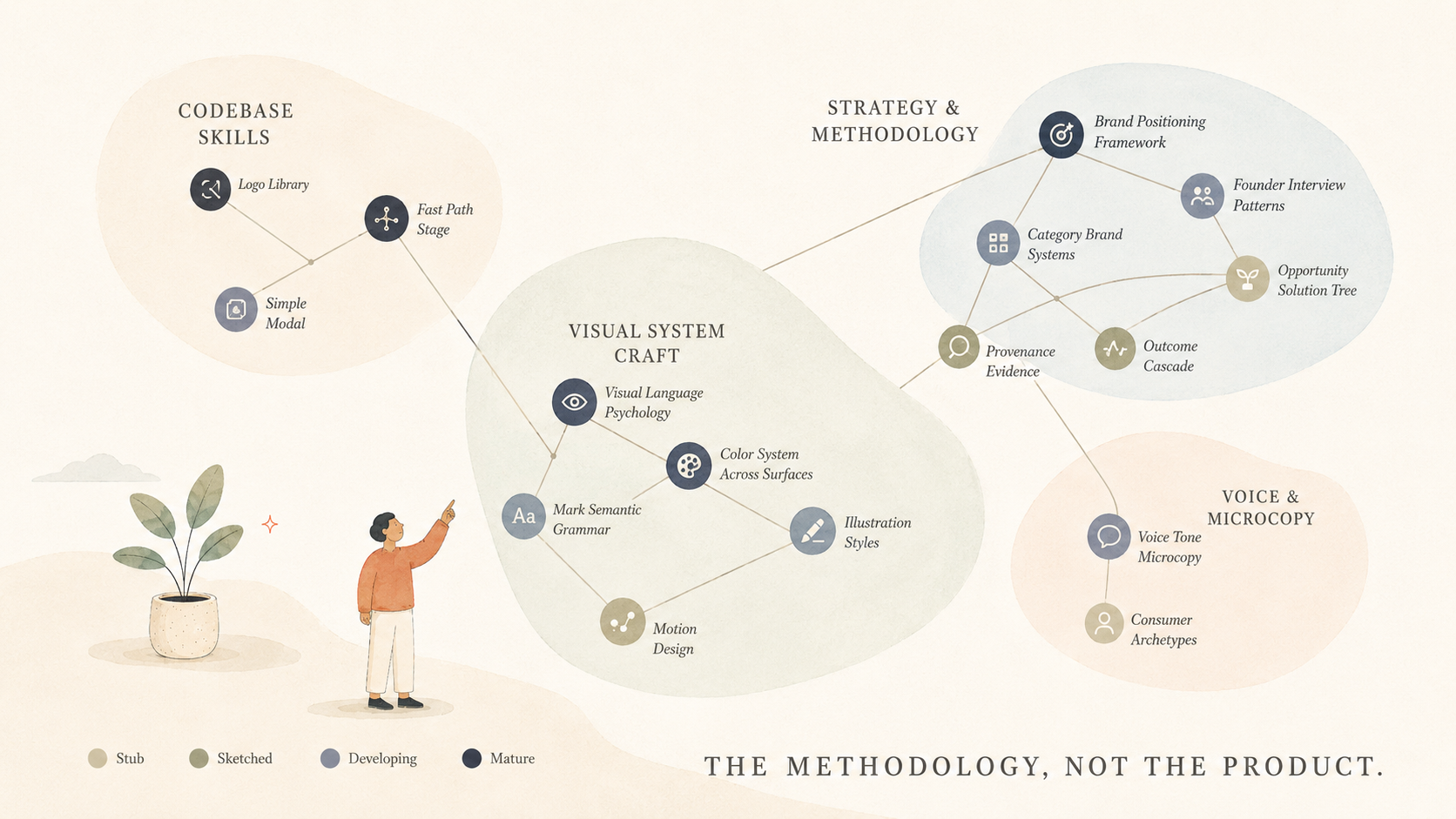
But the product isn't the case study. The case study is the methodology underneath — a skills inventory of about eighteen units, each one a packaged piece of expertise the LLM loads on demand, each one statused and growing. The product is the proof that the methodology compounds. That methodology is the thing I'd hand to a team. The product is just one expression of it.
This case study is about the thinking that produced both. Please join the waitlist of brand-builder.ai, I’d be happy to let you give it a try.
Why a Brand-First Approach
I want to name a tension I've watched for many years.
On one side: founders who need a credible brand foundation to fundraise, hire, and ship — and a market that sells them either a $30K–$80K agency engagement they can't justify pre-seed, or a DIY logo generator that produces something shallow enough they're embarrassed to use it. About 500,000 U.S. founders fall into this gap each year. The work is real, expensive, slow, and structurally unavailable to most of the people who need it.
On the other side: a quiet conviction among design leaders that brand strategy is too taste-driven to systematize — even as the same leaders watch generative AI tools fail to systematize it. Logo generators that produce four geometric primitives in a rotation. Brand-kit tools that pick fonts by category and call it done. Tools that confuse the outputs of brand strategy with the judgment that produced them.
Both sides are right about something. The first is right that the market is broken. The second is right that taste can't be templated.
The way through wasn't a better template. It was a different unit of work entirely.
Skills First APPROACH
A skill, in this system, is a packaged piece of design expertise — strategy, methodology, accumulated craft — that lives as a single markdown file (skill.md) with a sharp description field. The LLM loads it on demand: when a founder asks a category-shaped question, the category-brand-systems skill loads. When the logo synthesis prompt runs, the mark-semantic-grammar skill informs it. When a palette gets pressure-tested against real surfaces, the color-system-across-surfaces skill carries the rules.
Skills compound. Prompts decay. A prompt is a one-time configuration. A skill is the durable form of "here's what I keep re-explaining to junior designers about how to read a color in dark mode." Once you write it down well, the LLM can apply it forever, you can sharpen it across uses, and other people on a team can contribute to it. That's the methodology.
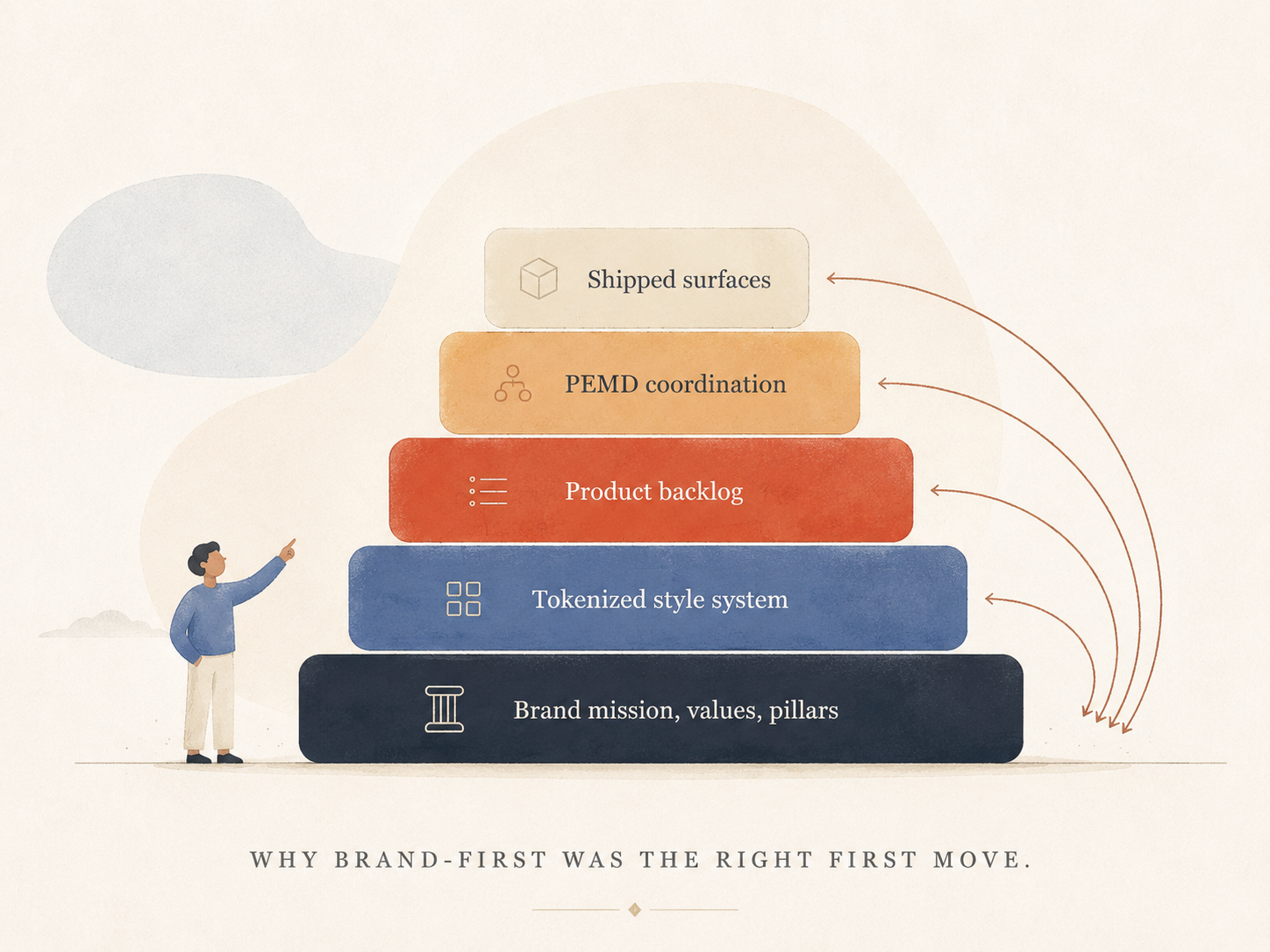
Brand-first was the deliberate sequence. Not because brand is more important than product — but because every downstream decision (which feature to ship next, which audience segment to lean into, what to put on the home page, how to write the empty state) is more when it's rooted in a clear brand mission, values, pillars, and a tokenized style system. Founders who go through Brand Builder end up self-aware about why their product looks and reads the way it does. That self-awareness is the lever the rest of the system is built to amplify. I believe the true definition of brand is that it’s the relationship between a business and its audiences. And all the while, I believe the product is also the truest expression of the brand relationship.
The skills system
Let me get concrete about what's in the inventory, because the abstraction "skills system" doesn't land until you see the shape.
There are codebase skills that protect the prototype from breaking in subtle ways when new features land:
logo-mark-libraryfast-path-stagesimple-modal
There are strategy and methodology skills that carry the thinking:
brand-positioning-frameworkfounder-interview-patternscategory-brand-systems
There are visual craft skills that carry the judgement:
visual-language-psychologycolor-system-across-surfacesmark-semantic-grammarillustration-stylesmotion-design
And there are voice skills that carry how the brand actually sounds:
voice-tone-microcopyconsumer-propensity-archetypes
Each skill has a status — Stub, Sketched, Developing, Mature. I downgrade them when I haven't touched them in months and the prototype hasn't exercised them. The downgrade is a signal that the skill might not be earning its place. The inventory is the source of truth: if a SKILL.md exists in the directory but isn't in the inventory, it's dead to me — either add it or delete it.
I wrote this in the skills inventory and meant it:
“a skill that's never tested against real outputs is just opinion under markdown headers.”
The status labels and the maintenance discipline are how I keep myself honest about which parts of my own taste are working in practice and which are decoration.
A worked example — what one feature looks like
Here's a single feature, end-to-end, that shows the methodology in operation. It's the logo upload flow, the most-used path in the tool.
A founder uploads their existing logo — in whatever format they happen to have. PNG, JPG, SVG, WebP, GIF, TIFF, AVIF — the server normalizes everything to a vision-ready PNG, sanitizes SVG content, rejects HEIC and PDF with friendly conversion guidance, enforces a dimension floor so the read is meaningful. The vision LLM analyzes the mark and returns a structured read: composition, mark type, type stance, corner stance, palette extraction, voice signals, confidence notes, a crop recommendation. That read shows up to the founder as a calm informational panel: *"Here's what we read in your mark."* Composition. Type. Corners. Palette swatches. Voice words. When confidence is low, the panel leads with the system's own uncertainty. When the LLM suggests a tighter crop, a small "Crop & re-read" button appears with an inline cropper that re-runs the analysis on the selection. Below the read, two correction surfaces:
A structured selector
Symbol only / Symbol + brand name / Brand name in type / Something else. Pre-selected from the vision read, but explicit. The founder either accepts our guess by moving on or overrides with one tap. When they pick "Brand name in type," the renderer auto-flips to wordmark-only mode so the tool stops trying to use the typelogo as a square symbol on favicons and app icons.
A free-text textarea. Anything we missed?* Optional. The textarea grows louder when confidence flagged uncertainty. Whatever the founder types is spliced into every downstream generation prompt as an authoritative override — *"the founder's classification wins on conflict."* What's interesting isn't the UI. It's the cascade.
One classification selector and one text area input.
From those, the founder's confirmed type and their own words flow as structured context blocks into five generation prompts — the identity directions, the brand directions, the scene illustrations, the hero image, the deliverable copy. Each consumer of the cascade has its own consumer-specific framing layered on top: scenes care about the mark's corner stance because it dictates illustration line weight; the hero image cares about leaving negative space in the top-left where the mark will sit; the copywriter cares about voice signals because the writing should feel native to the mark. But they all read the same source of truth. One paragraph the founder typed becomes the override layer in five places, in identical shape. When the LLM in the scenes prompt sees *"the founder confirmed this is a typelogo,"* the line weight, palette, and subject choices for the illustrations *change*. When the hero prompt sees the founder's voice override, the synthesized image's mood shifts.
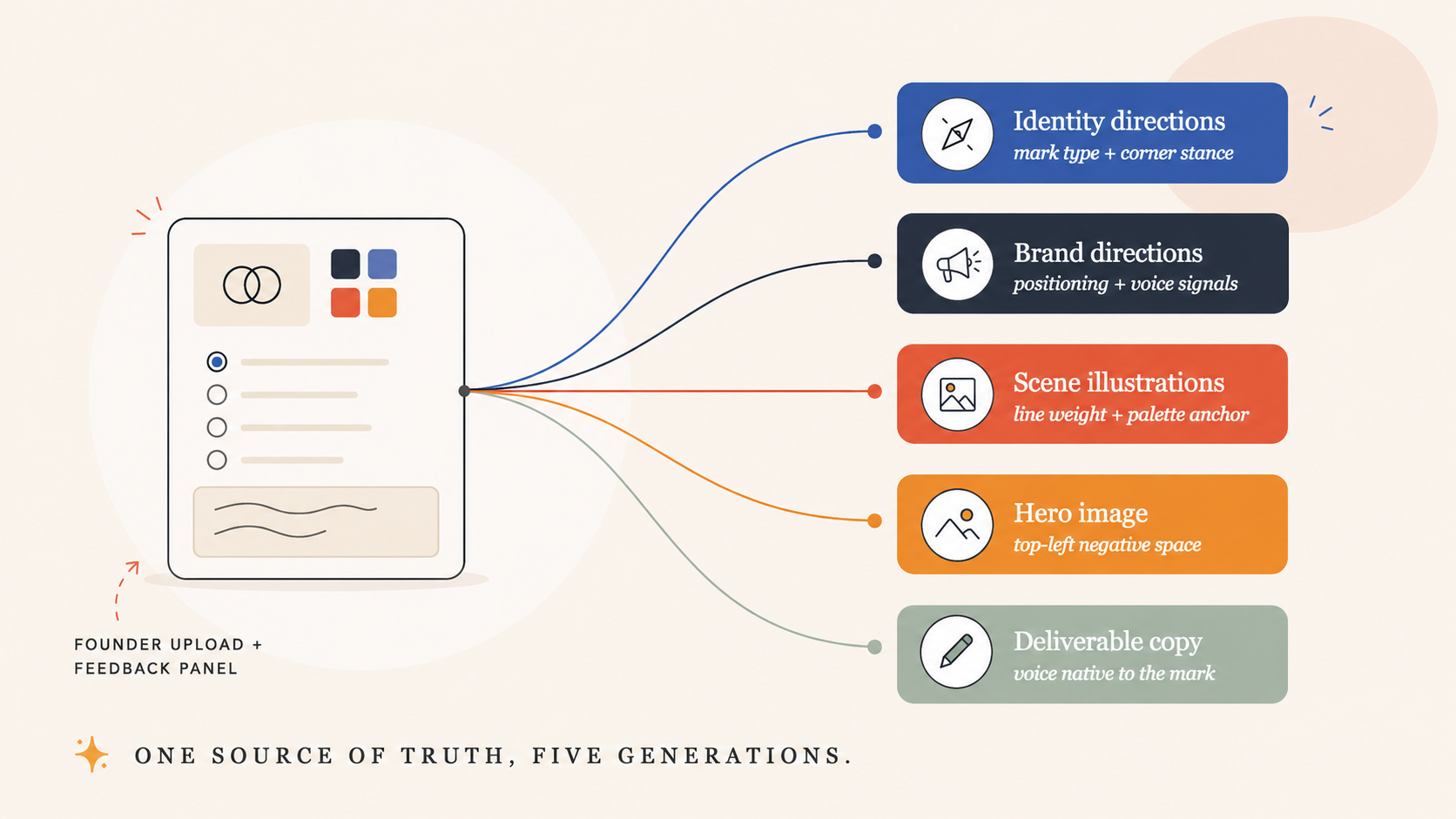
That cascade pattern is the methodology in miniature. The same shape applies everywhere else in the tool: a skill encodes the judgment, the runtime mirror exposes it as a structured context block, every consumer that needs it splices it in identically, and a single source of truth governs the whole surface area. When I sharpen the skill, every consumer gets the improvement for free.
Shipping solo, sustainably
There's a version of this case study where I tell you the stack — Vercel serverless functions, Supabase for state and storage, Anthropic for reasoning, fal.ai for image generation, vanilla web for the frontend — and call it a day. The stack matters, but it isn't the lesson. The lesson is the discipline that made solo-at-scope sustainable.
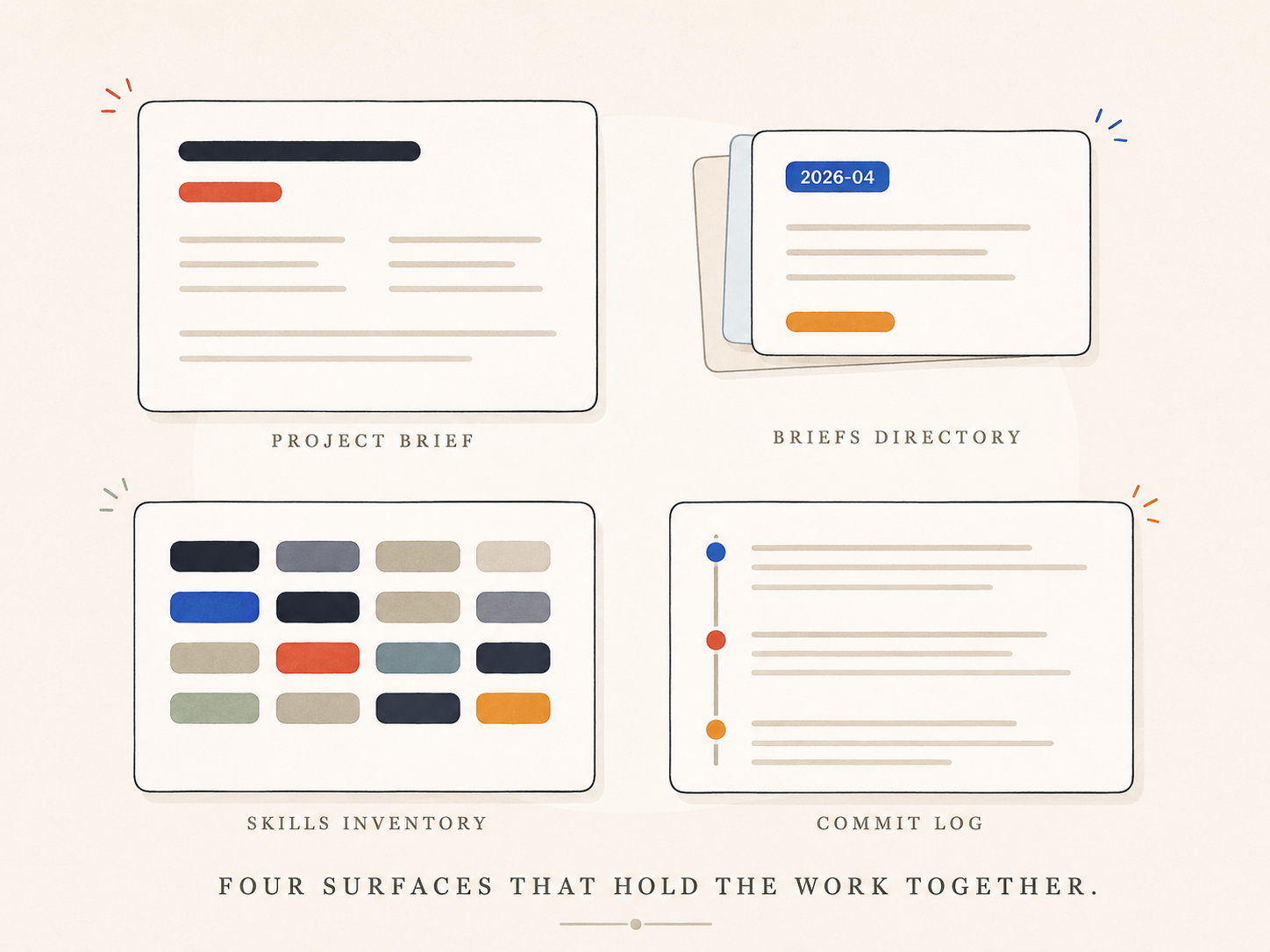
I keep a project brief at the root of the project that I open at the start of every session. It contains the persona (Asha Park — a technical pre-seed founder with strong taste who wants to be *collaborated with*, not generated *at*), the spine (the OST skill), the active tensions, and my house style. Every session inherits it. I don't re-explain the project to Claude every time. I update the brief when something changes.
I keep a `briefs/` directory of design specs, architecture decisions, and worked threads. Each brief carries the date and a structured status. When I want to know why a system is shaped the way it is, the answer is in there. When a future Claude session needs context for a touchy refactor, the answer is in there. The directory is the project's memory.
I keep the skills inventory updated like a real artifact. When a new pattern emerges — when I notice myself re-explaining the same thing in two sessions — I add a row with status `Stub` and start a SKILL.md. Monthly, I walk the inventory and downgrade anything stale, promote anything that's earned it, and process the captures at the bottom.
And I commit with discipline. Every commit message reads like a paragraph from a future blog post. Long-form. Specific. Names the tensions and the trade-offs. When I come back to a system six weeks later, the commit log tells me what I was thinking, not just what I changed.
None of this is glamorous. All of it is what makes the difference between "I built a thing solo" and "I built a thing solo that can grow."
3 Month REtro: What I'd do differently
Three honest reads, in no particular order:
I'd build the skills system first, the prompts second.
I shipped prompt builders before I'd named the skills, then spent months refactoring as patterns emerged. The skills system is what holds the project together; everything else is derived from it. If I were starting again, I'd write the inventory before I wrote the first generation prompt.
I'd frame the ambition as "design builder with brand at the spine" from day one.
I started this as "a brand-foundations tool" and let the larger shape accumulate. Brand-first was the right sequence; the framing wasn't. The product I'm now extending — a PEMD-aware design and product backlog system with brand as its load-bearing layer — is what I should have described in the first paragraph of the first brief. The early positioning made the eventual shape look like a pivot to outside readers. To me, it was always the plan.
I'd write the OST stance as a manifesto for the whole tool, not just as one skill.
The "surface trade-offs, never pick a winner" discipline of the OST should govern every generation surface in the product — the way logos are presented, the way directions are compared, the way the founder is shown the tensions in their own brief. I built the logo-upload cascade first because the founder pain was loudest. If I were sequencing again, I'd write that manifesto first and let every feature inherit from it.
Where it's going — democratizing PEMD backlog work
Brand-first was the foundation. The next layer is what I'm building toward now:
Opportunity Solution Trees (OST)
Turning the same opportunity tree into something four functions (Product, engineering, marketing, design) can co-build a backlog from. — each reading the same evidence, each pulling different work, so bets and investment decisions can be built with shared rationale, but most importantly, shared understanding. For solo founders wearing all four hats, this means simulating four lenses without four people in the room.
The OST skill is the spine of that layer. It generates a Teresa Torres opportunity tree rooted in a real business outcome, with an outcome cascade underneath — because you can't act on a lagging business metric inside a discovery cycle. Brand work doesn't move revenue directly; it moves message-market resonance, recall, trust, intent-to-try. Those move revenue. The cascade makes that line of sight visible.
Every opportunity node carries provenance (`interview` / `brief` / `hypothesis` / `doc`) and evidence strength. The loudest source must not impersonate the truest one. A founder hypothesis is an *assumption to test*, not a finding. Provenance tags survive all the way to the output, so a confident-sounding bet that was actually just optimism reads correctly.
And the discipline that defines the whole stance: the skill surfaces a trade-off comparison and names the tensions — it never emits a score, a ranking, or a recommended winner. The team decides. A skill that picks for the founder is the skill that taught them nothing.
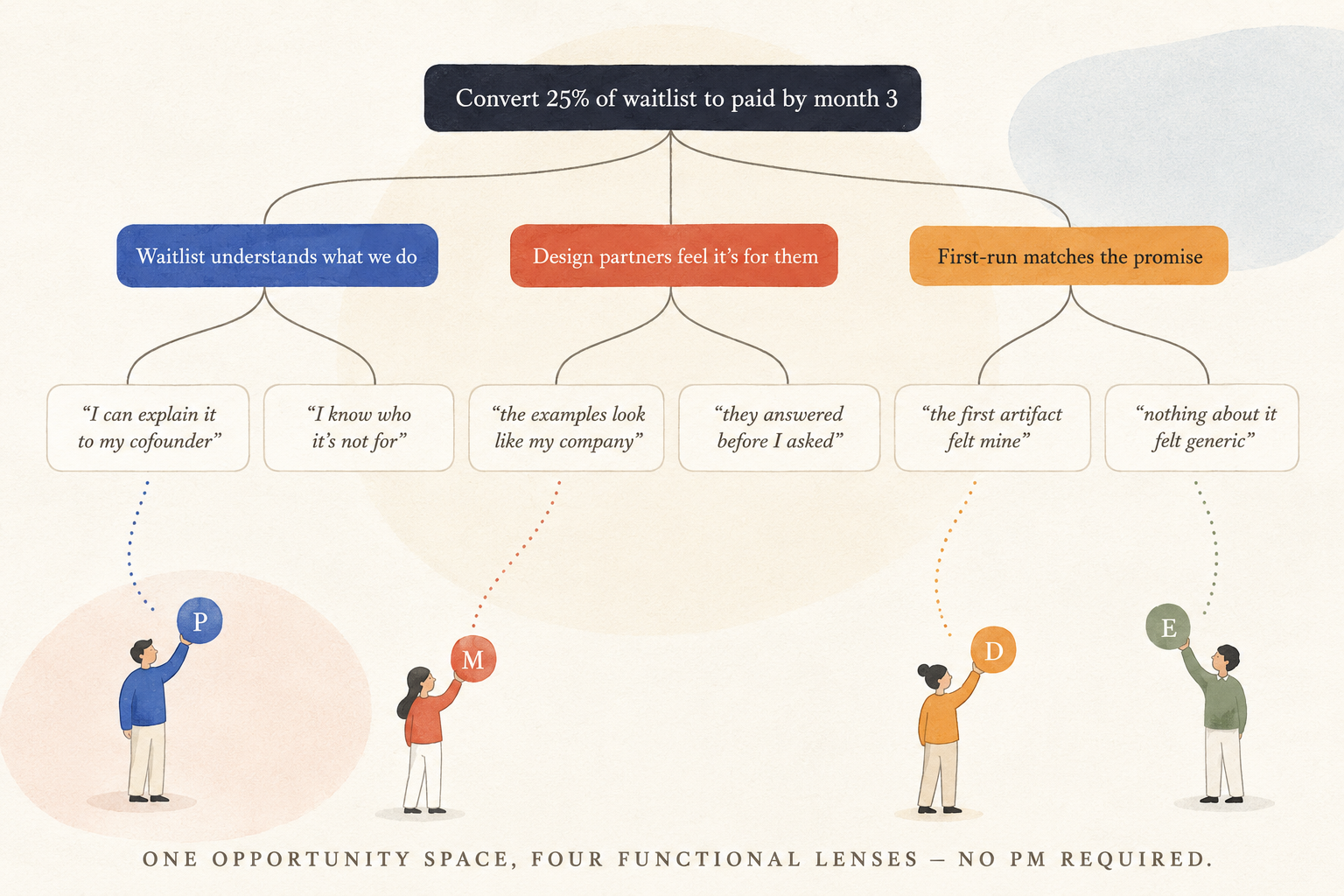
There's a tension here I'm sitting with rather than resolving. The OST refuses to score; TheyDo's (the journey-management platform I'm evaluating for integration) core move is a weighted score. Where does each belong? Is the OST the "make the trade-off legible *before* anyone scores" layer that feeds a TheyDo-style scoring engine — or do these philosophies actually fight? The integration question — does Brand Builder's OST *feed* TheyDo, sit *alongside* it, or *wrap* it — is the next strategic call to make.
Underneath all of it is the wicked problem I keep coming back to: making hard product trade-offs that demand financial predictability AND pure innovation instinct *simultaneously*. The OST is the closest thing I've found to a tool that holds both without collapsing one into the other. It's going to take weeks of build work to make it really useful — and unique enough in the market to matter. I think it's worth the months.
The new wellspring
I want to close on a belief — not a prediction, a belief — that's been shaping how I think about the next decade of design work.
The tools that extract and encode expertise don't replace expertise. They extend its reach. When a brand-strategy decision that used to take a senior designer four hours can be made by a junior team member in twenty minutes — because the methodology that produced the four-hour version has been encoded into a skill the tool runs on — the senior designer doesn't lose their job. The work they do *shifts*. They stop being the person who answers a thousand instances of the same question. They start being the person who *writes* the skill that answers a thousand instances of the same question. Then they go work on the next question.
This is the new wellspring. It's where the next generation of senior design work lives — encoding judgment as durable artifacts, curating systems of those artifacts, teaching teams to read and contribute to them. The design leaders who thrive in the next ten years won't be the ones who watched their teams' work and approved it. They'll be the ones who built the systems their teams' work runs on.
Brand Builder is one expression of that bet. Aether.AI and a handful of other tools in this space are others. The pattern is the same: take the tacit, taste-driven, expensive judgment that lives in senior heads, and encode it as a system that compounds. The product is downstream. The methodology is the asset.
I built this one solo to prove I could. I'd build the next one with a team, because the methodology gets sharper when more people contribute to it. If you're building something where this shape of thinking would be useful, I'd love to connect.
The Asset Intelligence Platform
For six months I’ve been circling a question our industry still treats as optional: how do we capture the expertise behind great creative work — not just generate assets faster?
The Asset Intelligence Platform is my answer. Start from the job to be done. Model the judgment the job actually requires. Only then generate the assets. Everything else is downstream.
The question under the tools
Information is abundant. Expert judgment is rare.
Nearly every AI creative tool shipping today makes the abundant thing more abundant — more logos, more heroes, more copy, faster. Almost none of them touch the scarce thing: the mental models, the tradeoffs, the taste, and the failure patterns that decide whether any of that output is actually right.
I’ve spent almost twenty years as a product designer working at the brand–product intersection, including a multi-year visual brand refresh at Zillow scale. Over the past six months I shipped a stack of working products with AI as my pair: a founder brand-intake tool with hundreds of commits, an illustration-system builder that trains a LoRA on one illustrator’s hand, a prompt library with a Chrome extension that rides shotgun in any text field. Each one embodied real creative judgment. The problem was that the judgment still lived in my head and in scattered docs. Every new product started from a blank page.
AIP is where that judgment becomes infrastructure. Its founding move is simple and non-negotiable: start from the job to be done, never the asset type. A logo, a brand guide, a website hero — these aren’t the product. They’re compiled expressions of intent, context, capabilities, decisions, and evaluation criteria. Model that chain explicitly and the asset stops being the point. The judgment is the point. The asset is what it compiles to.
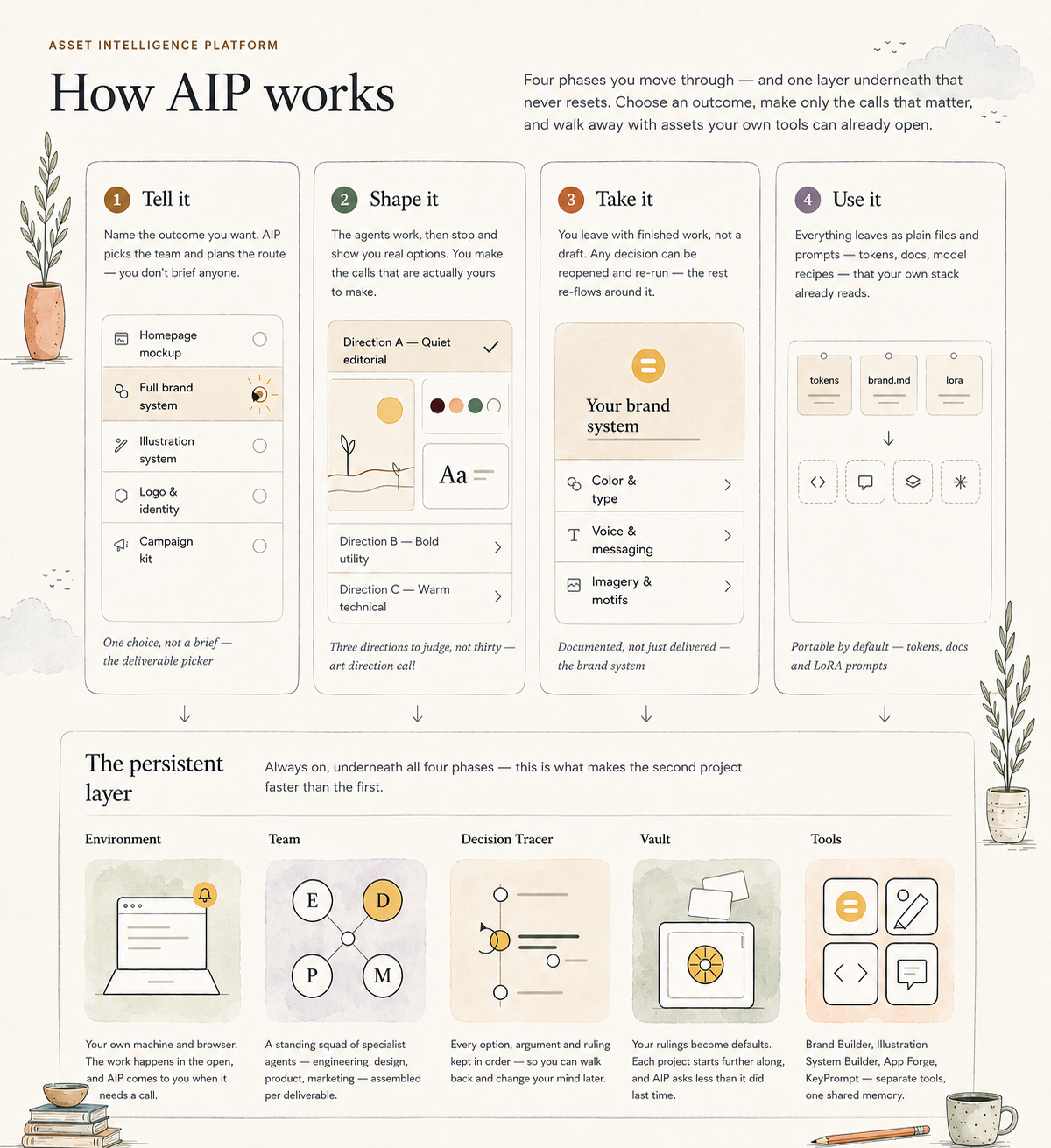
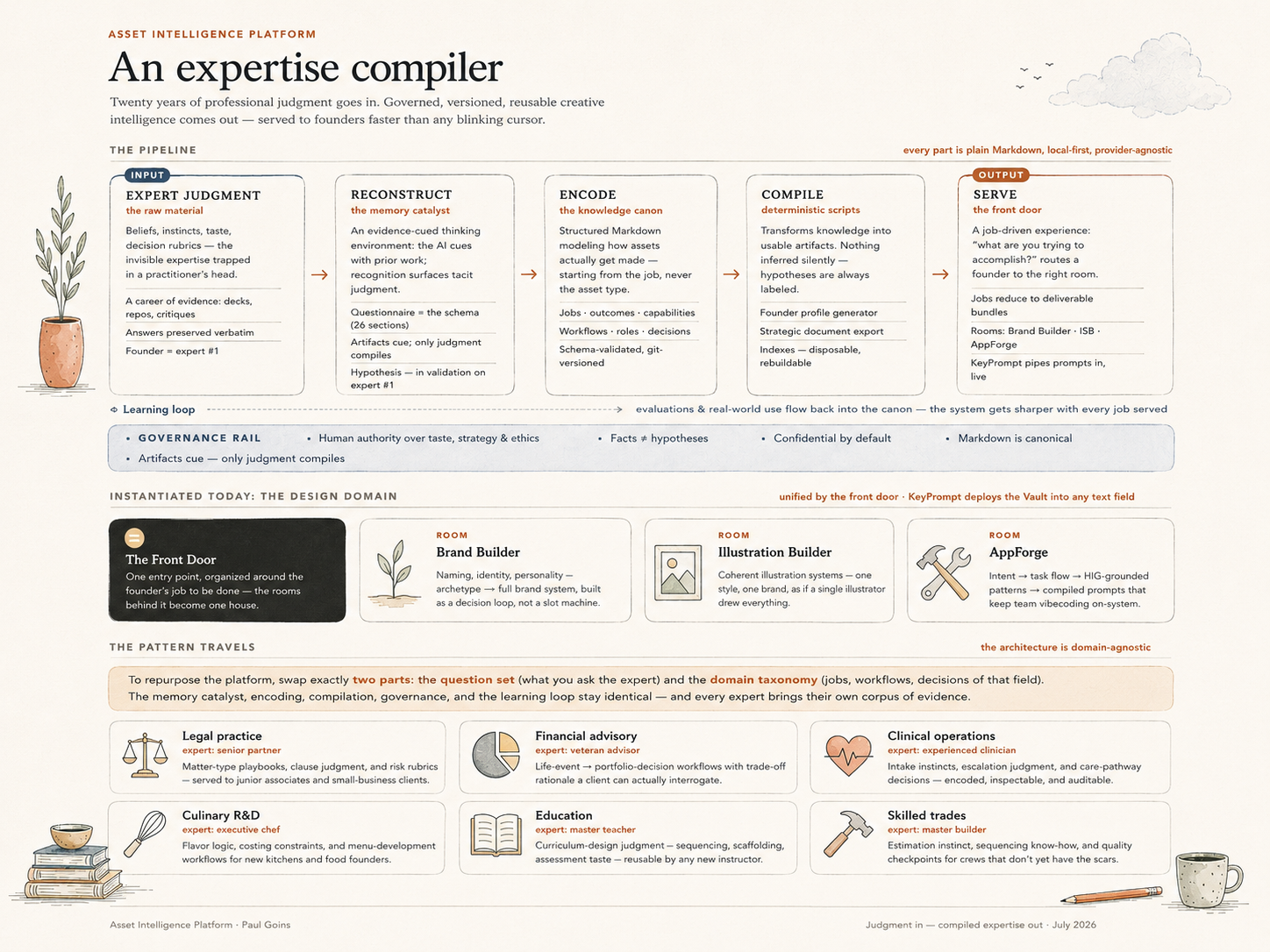
The portfolio as a stack — Brand Builder, Illustration System Builder, AppForge, PromptVault/KeyPrompt as surfaces on top; AIP as the shared knowledge layer beneath them; gateway and contracts as the connective tissue.
Trained on its founder first
Under the hood, AIP is deliberately unglamorous: a version-controlled repo of plain Markdown with YAML frontmatter, validated by schemas and scripts. Jobs, outcomes, capabilities, assets, workflows, roles, decisions — all cross-referenced, diffable, and provider-agnostic.
Two rules give it its character.
1. Every fact is separated from every hypothesis. Anything the system infers stays flagged as a guess until a human ratifies it.
2. A human keeps authority over strategy, meaning, and taste — by doctrine, not as an afterthought.
Before the platform hardened into software, it got trained on me. I answered all twenty-six sections of its Founder Foundation questionnaire — five hundred-plus answers, as much of my own working brain as I could get onto the page — and compiled the result into twenty-six structured knowledge files. That capture taught me the platform’s most important lesson: you cannot download your own expertise. Judgment doesn’t surface on demand. It surfaces in response to cues — old work, contradictions, a diagram that gets your idea slightly wrong. So the capture instrument evolved from a straight interview into an evidence-cued thinking environment. Expertise is reconstructed, not retrieved.
The front door compiles the brief
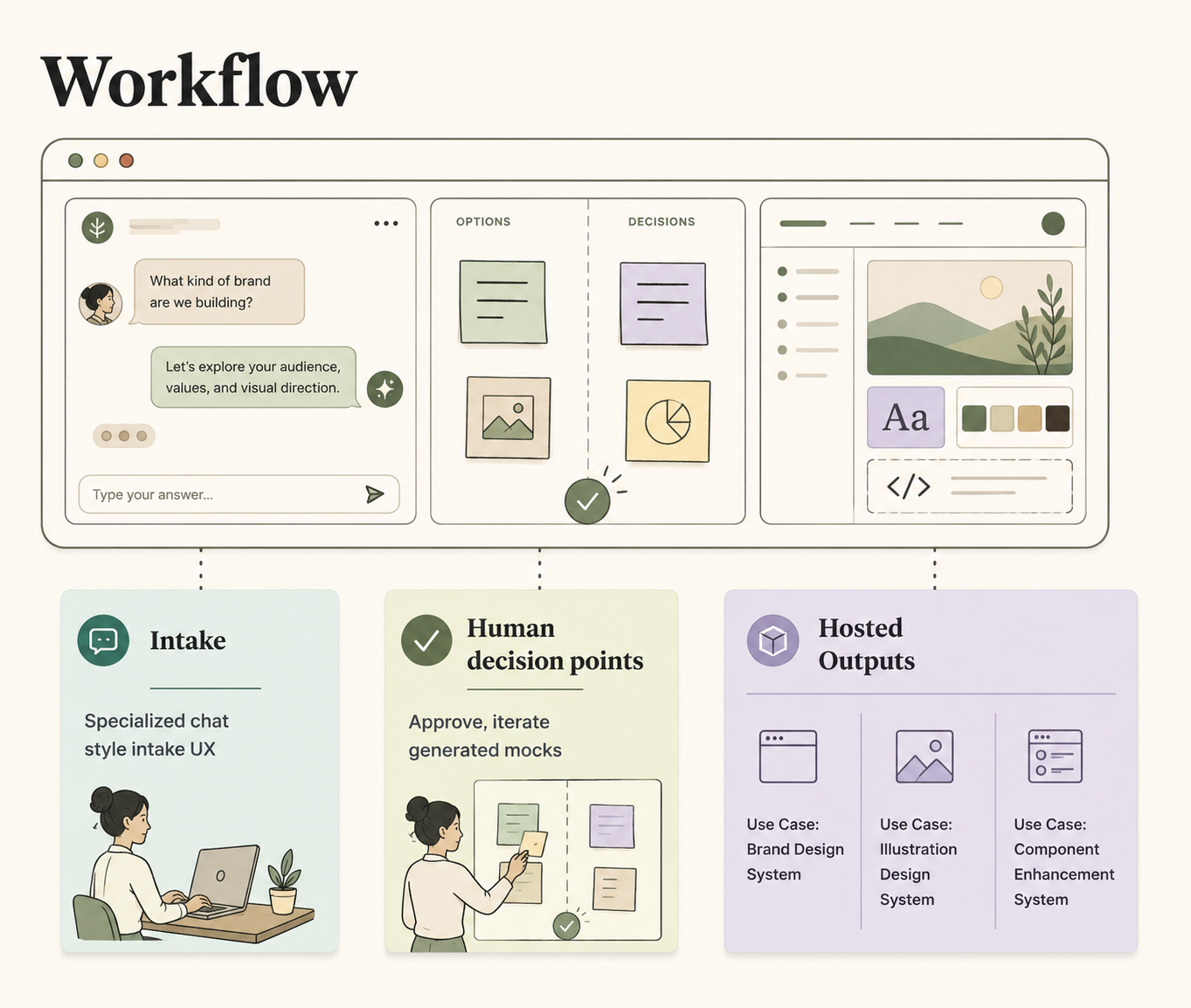
A founder arrives wanting a deliverable — a homepage, a brand system, an illustration style, a logo. The front door’s job is not to collect a brief. It is to compile one, in three beats.
The opening question is never “tell us about your company.” It’s “what do you want to walk away with?” Each choice silently resolves to a route through the platform’s rooms. The founder never sees the plumbing.
Then a short guided conversation — five questions at most — compiles the governing document live and in view: outcome, route, audience, hard rules, weights. The PRD is an output of the front door, not an input to it.
Finally, before anything runs, the founder sees the gate map: the whole journey with their decision moments flagged. “You’ll make about four decisions. We do everything else.” Ratifying the brief is Gate 0. Nothing advances past a gate without them.
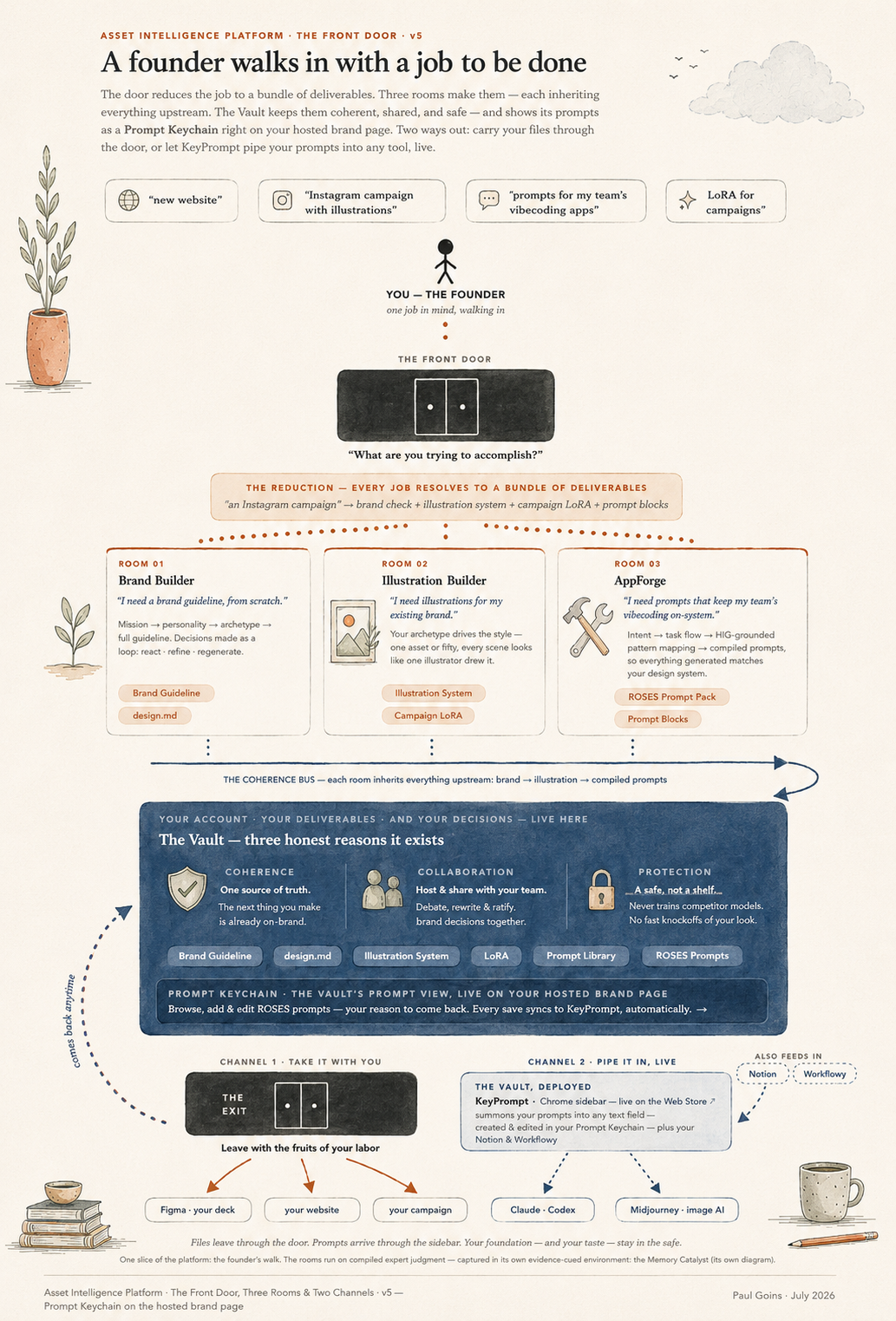
Three beats to a governed run. Deliverable-first entry → the brief compiling live beside the conversation → the gate map shown as a contract.
Designed for one human. The swarm is optional
This is the part I want to be precise about, because it’s where the platform diverges from the current agent-mania.
AIP is built first and foremost as a human-in-the-loop experience. You can walk the entire flow yourself — intake, Brand Builder, the rest of the tools — with no agents at all. The interface is designed so a single founder can make every decision, iterate on stylescapes and concepts, and leave with a clean set of deliverables. The designed experience stays paramount.
If you prefer, you can activate a custom agent squad: Product, Design, Engineering, and Marketing specialists, plus a Decision Arbiter — or any smaller mix. The intake fans out to the four specialist reads. The arbiter distills their debate into a single proposal and, by doctrine, never self-approves. Between gates the agents handle the busywork inside the tools. At the flagged moments a decision card arrives: the question in plain language, each discipline’s position, the weights at stake, and five clear levers — approve, approve the alternate, approve with modification, reject with guidance, or pause.
The arbiter frames the debate. The founder rules. Every ruling is logged to a decision trail and trains better defaults, so the platform asks less on every subsequent visit.
The squad is still experimental, and I think that honesty is a feature. But the first live run already validated the shape: a single approve-with-modification through a gate card produced the best artifact of the entire run. The system drafts. The human ratifies. Nothing auto-ships.
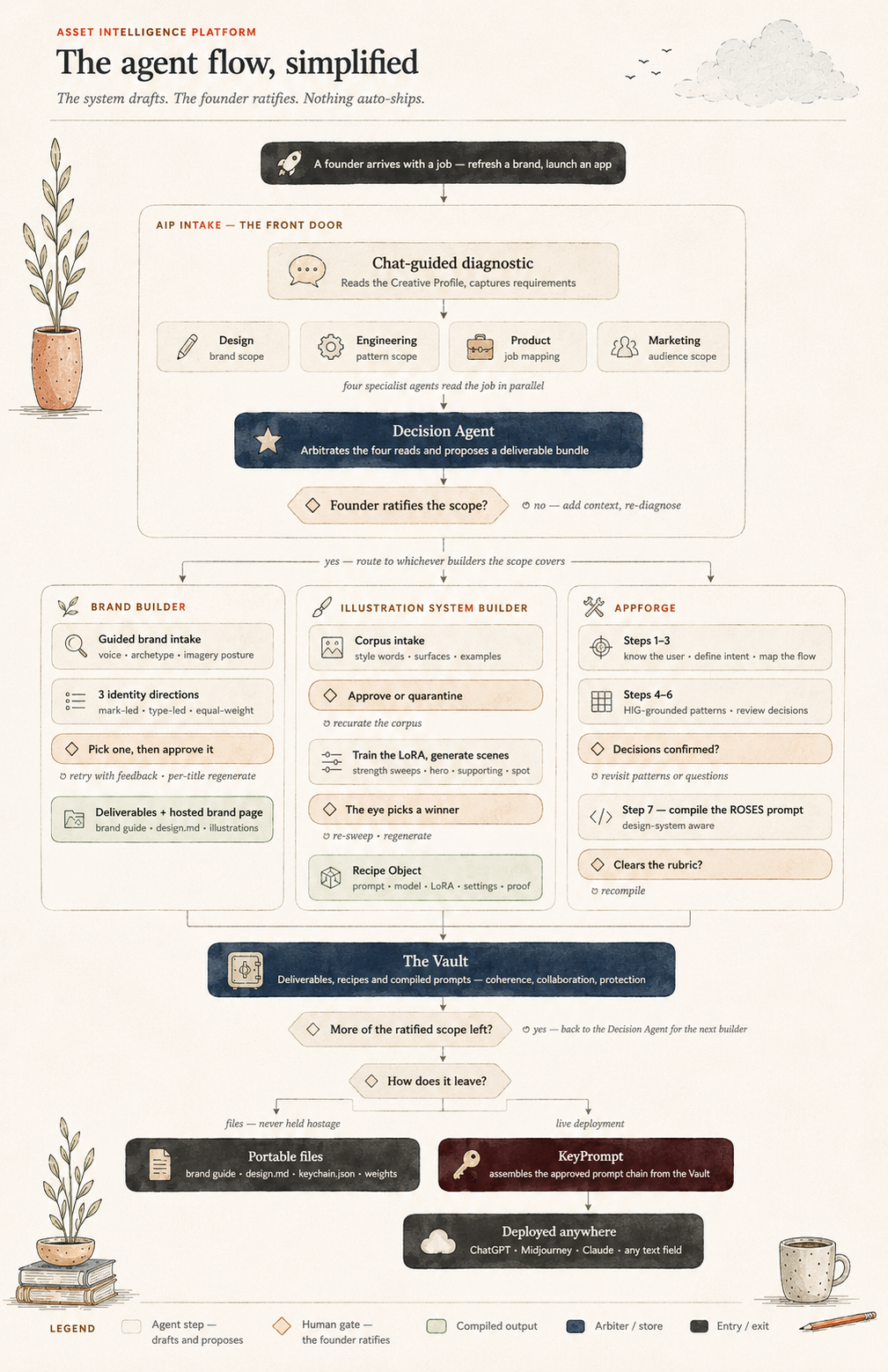
The agent flow, gates and all. Intake fanning out to the four specialists, the Decision Agent proposing, the founder’s diamond-shaped gates at every ratification point, routes through the three builders, convergence in the Vault.
The rooms, and the contracts between them
The platform routes work into rooms that already exist as standalone products — one gateway, many doors, never a merged mega-app.
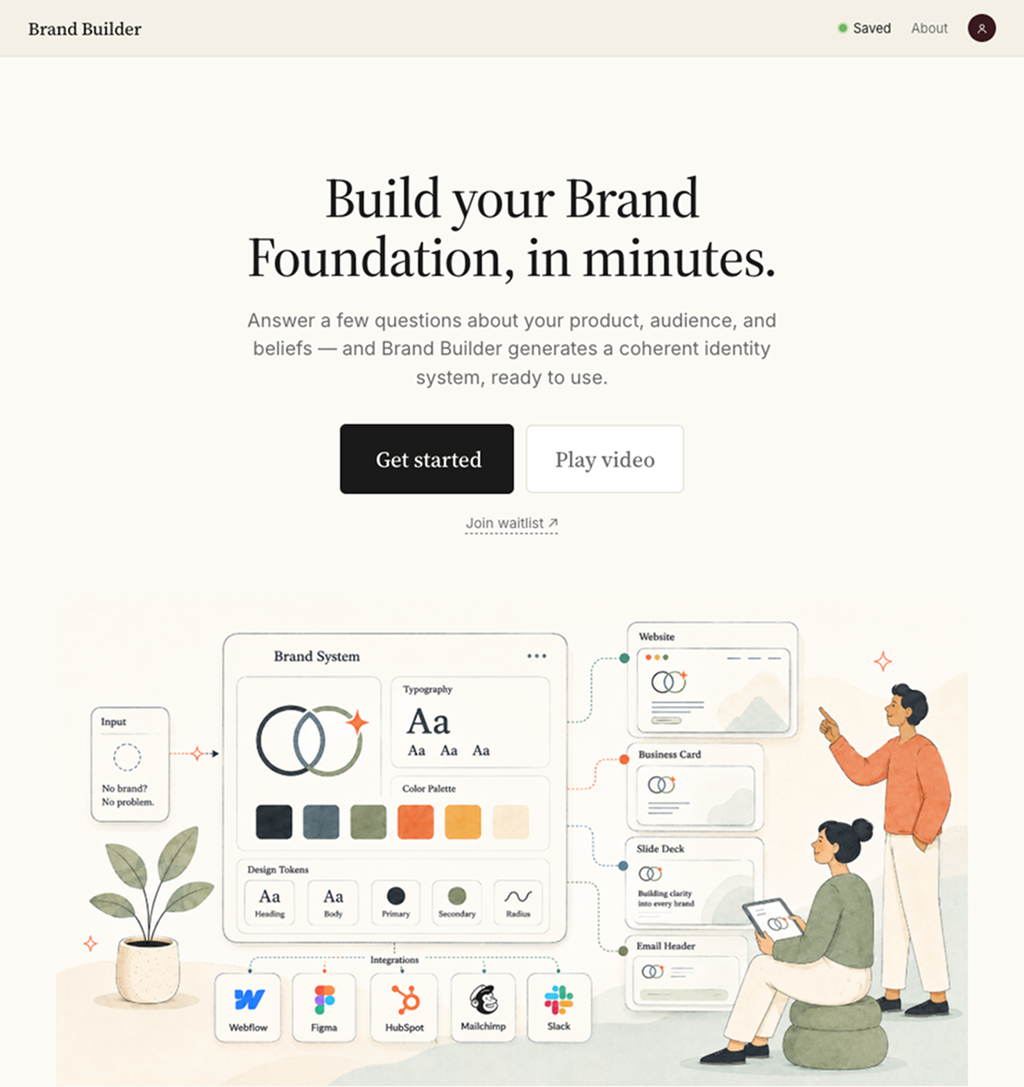
Brand Builder walks a founder from a three-minute conversation to a complete starter brand and a design.md that hands off cleanly to any downstream tool.
Illustration System Builder turns one illustrator’s hand into a governed system — constitution, skins, rulebook, calibrated captions, trained weights.
AppForge interrogates a builder’s intent and compiles a design-system-aware prompt for whatever coding tool they already love.
KeyPrompt store validated prompts and deliver them at the point of use.
What makes these one platform rather than a folder of apps is a pair of small, explicit contracts.
The Recipe Object (in production today) says a saved prompt is never bare text. It is the compiled prompt plus model, LoRA reference, validated settings, and a proof image — because provenance is half the quality.
The Creative Profile (specified, next to build) is the running record of everything any room has learned about a user, so every intake reads it first and asks only what’s missing. That’s the mechanism that makes knowledge compound instead of scatter.
The signature move repeats in every room: stop short of generating the final artifact. Hand over compiled judgment in portable form. These tools never compete with generation tools. They govern what goes into them.
The exit is the point
Everything a run produces — briefs, decision logs, prompts, recipes, LoRA links — lands in a hosted page you can download or keep living in Google Drive, where you and the agents can also pull reference images straight into the flow.
And the files are never held hostage. The brand guide, the design.md, the keychain.json, your trained weights — all portable, all yours to run anywhere. Then you hop over to Figma or Adobe with a coherent, production-ready starting point instead of a blank canvas.
I call the custody position open with gravity. The water is free — you own the weights. The reason you come back is the fountain: a generation experience plumbed into your system, your rulings auto-appended, your history remembered. Retention through novel value, never through capture.
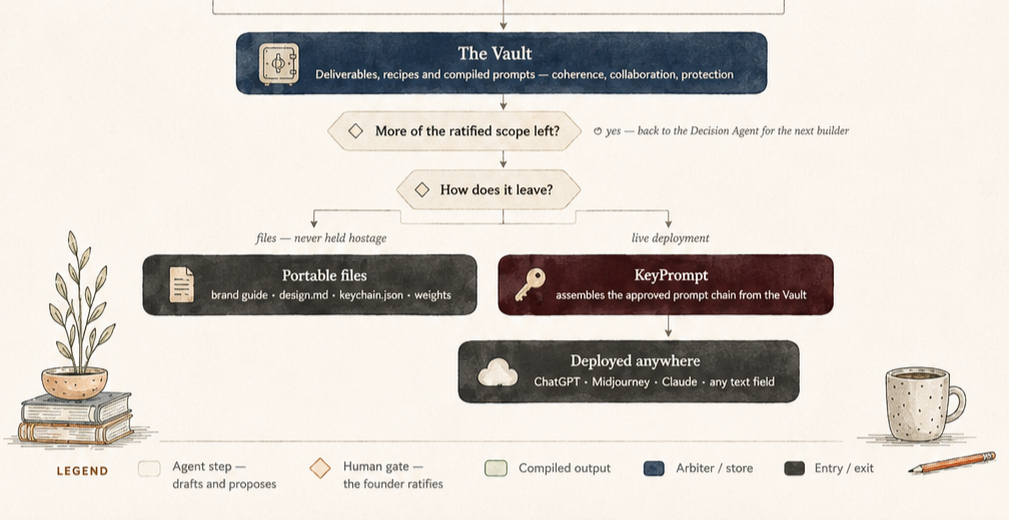
What leaves, and where it goes. The Vault converging the rooms’ outputs, then splitting to the two exits: portable files (brand guide, design.md, keychain.json, weights) and live deployment through KeyPrompt into any text field on the web.
What this means beyond one platform
I'll name what's proven and what isn't.
Built and live: the products, the knowledge base, the questionnaire, the Recipe Object.
Mapped and validated in a first run: the front door and the gate cards.
Experimental: the agent squad.
Untested: capturing an expert who isn’t me. Expert #2 is the real test of everything.
The bet underneath is bigger than my portfolio. The tools that extract and encode expertise don’t replace experts — they extend their reach. The senior designer stops being the person who answers the thousandth instance of the same question and becomes the person who writes the system that answers it.
That’s the framework I’m really bringing: a way for organizations to encode their best creative thinking into systems that compound — inspectable, versioned, and governed by the humans whose judgment they carry.
Assets are downstream of judgment. Make the judgment explicit first, and everything you make after starts from a full page.
I'm a product designer who ships. If your team is figuring out what AI means for creative work — or you want a demo of any of this — I'd love to talk: info@paulgoins.com · paulgoins.com
What I Learned Building Five Products with AI
In February I decided to stop making mockups of ideas and start shipping them. Five months later I have a prompt system live on my own domain with a Chrome extension pulling from its API, a 3D product-mapping tool, and a founder-facing prototype with 350+ commits. Here's the work — and the thinking behind it.
I'm a product designer. For most of my career, "done" meant a polished Figma file handed to engineering. This year, AI-assisted development tools — Claude Code, Grok, and friends — collapsed the distance between designing a thing and having the thing. So in February I set a simple rule for myself: every idea worth exploring gets built, deployed, and used. No dead artboards.
What follows isn't a list of tutorials I completed. Each project started with a real problem — mine or someone else's — and ended with working software. That shift, from rendering intent to shipping behavior, changed how I design more than anything since I learned to prototype.
Prompt System
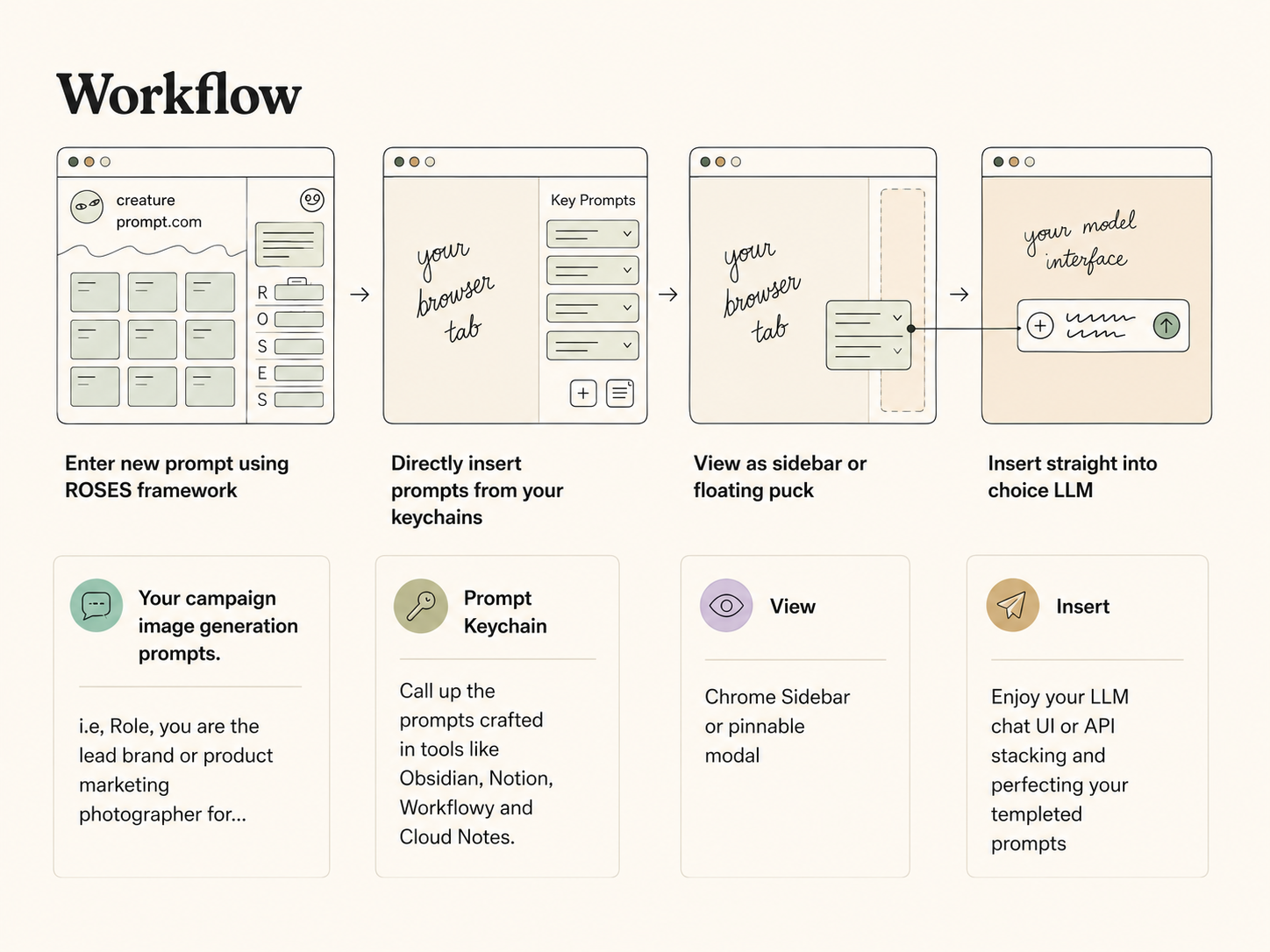
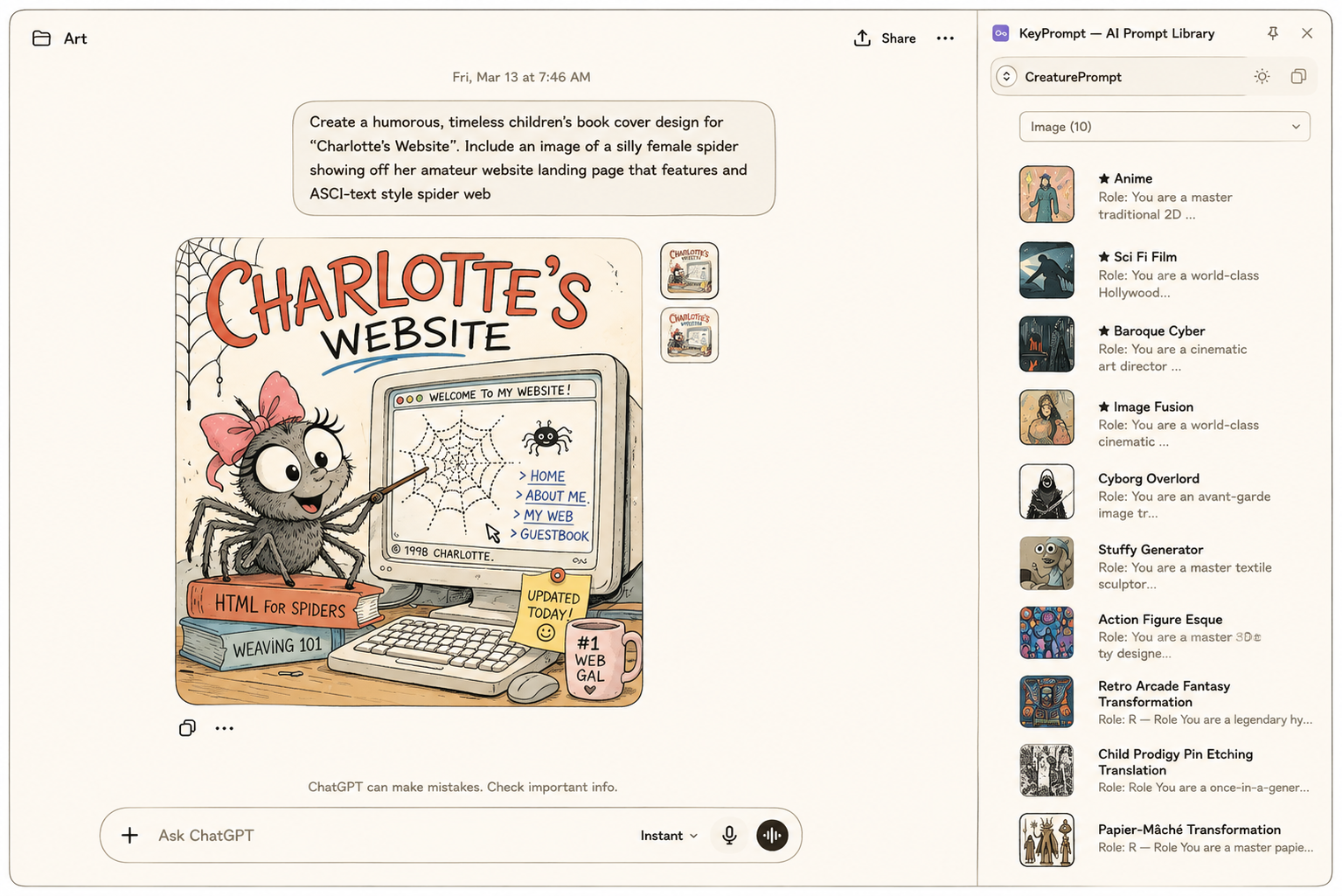
Like everyone working seriously with AI, I had prompts scattered across text files, chat histories, and memory. Instead of one app, I built a connected system with two surfaces — because the problem has two moments: the moment you organize a prompt, and the moment you need it.
PromptVault is where the library lives: a self-hosted prompt management web app built around the ROSES framework (Role, Objective, Scenario, Expected Solution, Steps), with adaptive builders that change their fields depending on whether you're prompting an LLM, Midjourney, or a video model. Making structure feel helpful rather than bureaucratic drove the design — a drag-and-drop gallery, live preview stitching, a scratchpad for composing complex prompts. Behind the UI: a Node/Express backend, automatic backups, v1 migration, and a real deployment on my own domain. Ninety-eight commits in under two weeks.
KeyPrompt is where the library gets used: a Manifest V3 Chrome extension that summons your prompts with Cmd+Click inside any text field, inserts them framework-safely, and gets out of the way. The key design decision was what it doesn't do — it deliberately never pins itself to any site's DOM, so ChatGPT or Gmail can redesign their composer tomorrow and KeyPrompt keeps working.
The two are now literally one product: KeyPrompt pulls the live library straight from PromptVault's API. Curate a prompt at home and it's instantly available in any text field on the web — the extension assembles the full ROSES prompt at the moment of insertion, grouped by generation type. The integration is deliberately read-only (editing stays in the vault, where editing belongs), and the API calls live in the extension's background worker so credentials never touch a web page. One source of truth, two surfaces, each doing only its job.
What it demonstrates: System thinking across surfaces — one product designed for both its storage moment and its point-of-use moment, then actually connected end to end: web app, REST API, and browser extension with a security-conscious architecture.
Brand Builder — a founder intake that thinks with you
352 commits, April through today
Brand Builder is the deepest product thinking of the batch: an intake experience that walks a startup founder through defining their brand — with a fast/full path choice, auto-save, and a Naming Generator built as a decision-and-iteration loop rather than a one-shot form. Behind it sits a growing API layer that generates logos, taglines, brand stories, scene illustrations, even trademark pre-checks — and it's gated behind edge middleware for private investor previews.
The interesting design problem: AI generation is cheap, but decisions are expensive. The naming loop treats generated options as raw material for a conversation — react, refine, regenerate — instead of a slot machine. That framing shaped the whole product.
What it demonstrates: Sustained iteration on one product (three months, 350+ commits), designing human-AI decision loops, and shipping investor-ready work under real constraints.
OST Browser — making product discovery tangible
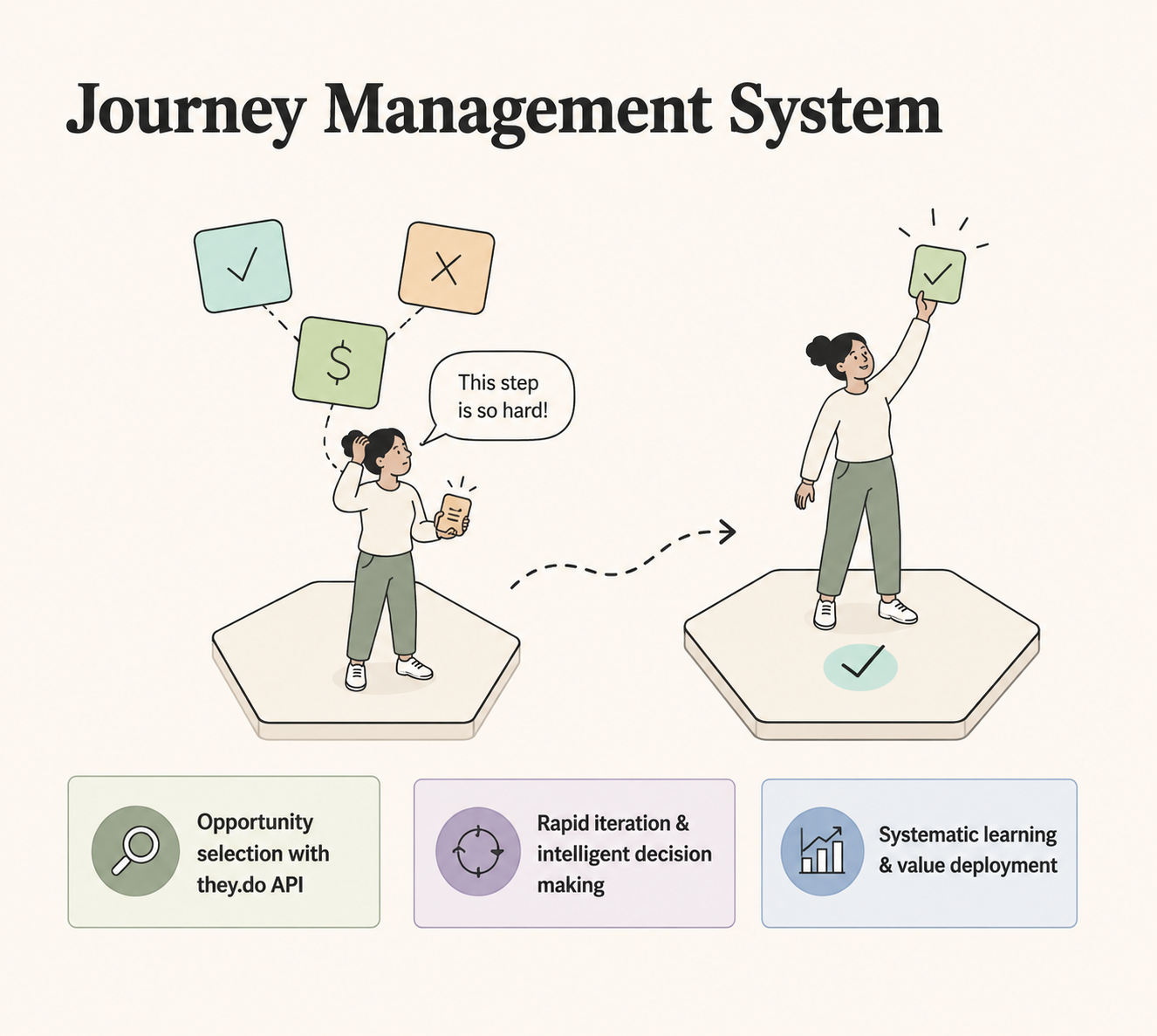
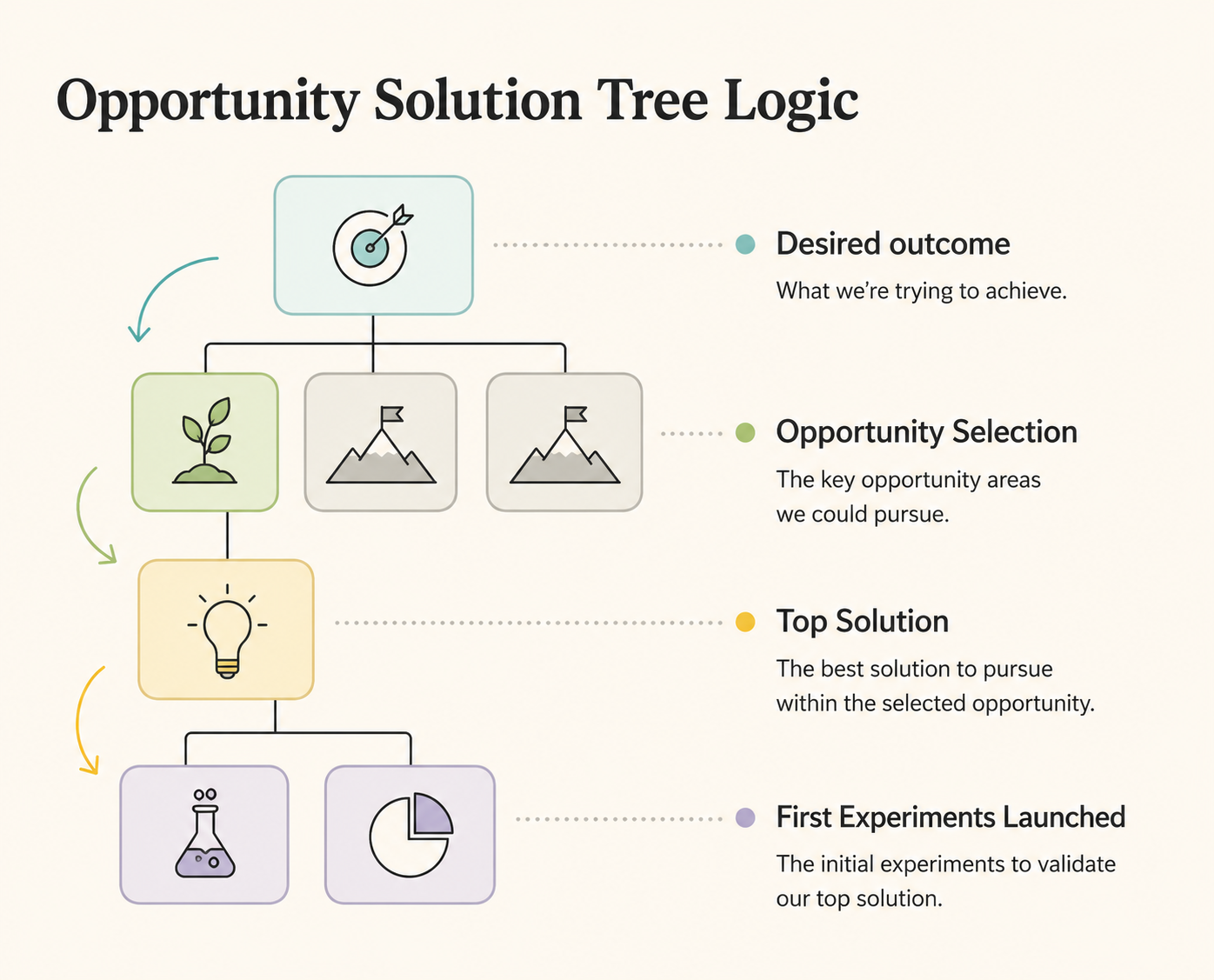
Opportunity Solution Trees (Teresa Torres' discovery framework) are usually drawn once in a workshop and forgotten. I built a zoomable, pannable OST workspace in React + TypeScript: a canvas view synced with a Workflowy-style outliner, a journey-mapping sidebar, and — my favorite part — built-in A/B test statistics (z-tests, p-values, sample-size planning) attached directly to experiment nodes.
What it demonstrates: Fluency with the modern discovery toolkit, and the conviction that process artifacts should be living tools, not workshop souvenirs. Integrates with they.do (journey management).
Currently in private beta. Message me if interested in operationalizing opportunity selection at scale.
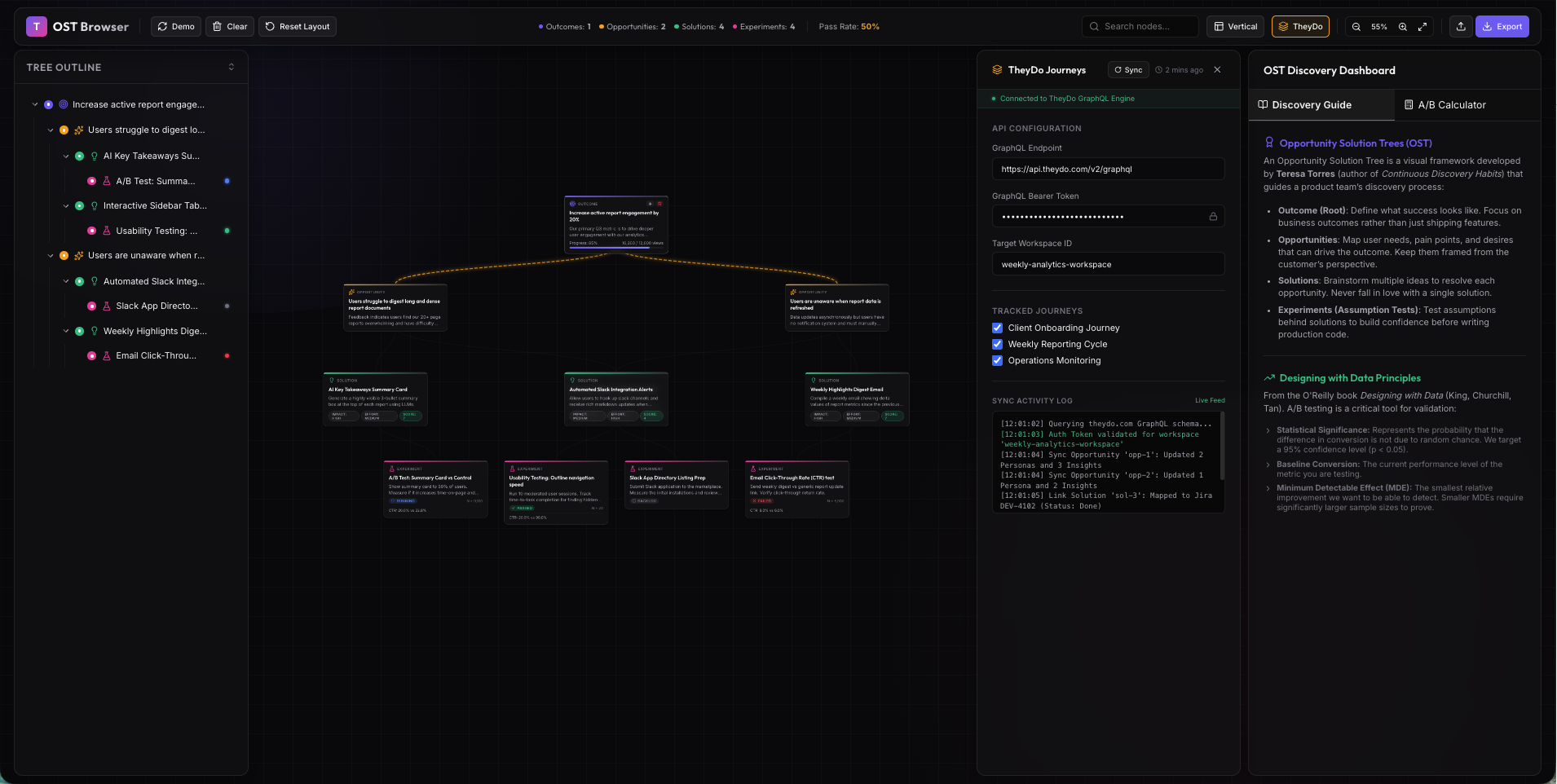
Expert dashboard allows Product Managers to share opportunity selection decision rationale faster.
Elevation — mapping product stacks in 3D
Modern products are stacks: frontend surfaces sitting on persistence layers, prompt orchestration, LLM routers. Elevation renders that stack as a navigable 3D "layer cake" — orbit the whole system, then dive into any layer on an infinite tldraw canvas. Next.js 15, React Three Fiber, and a lot of thinking about how spatial memory can make architecture discussions concrete for non-engineers.
What it demonstrates: Novel information-design instincts backed by an ambitious technical stack (3D rendering + infinite canvas in one app).
Currently in private research.
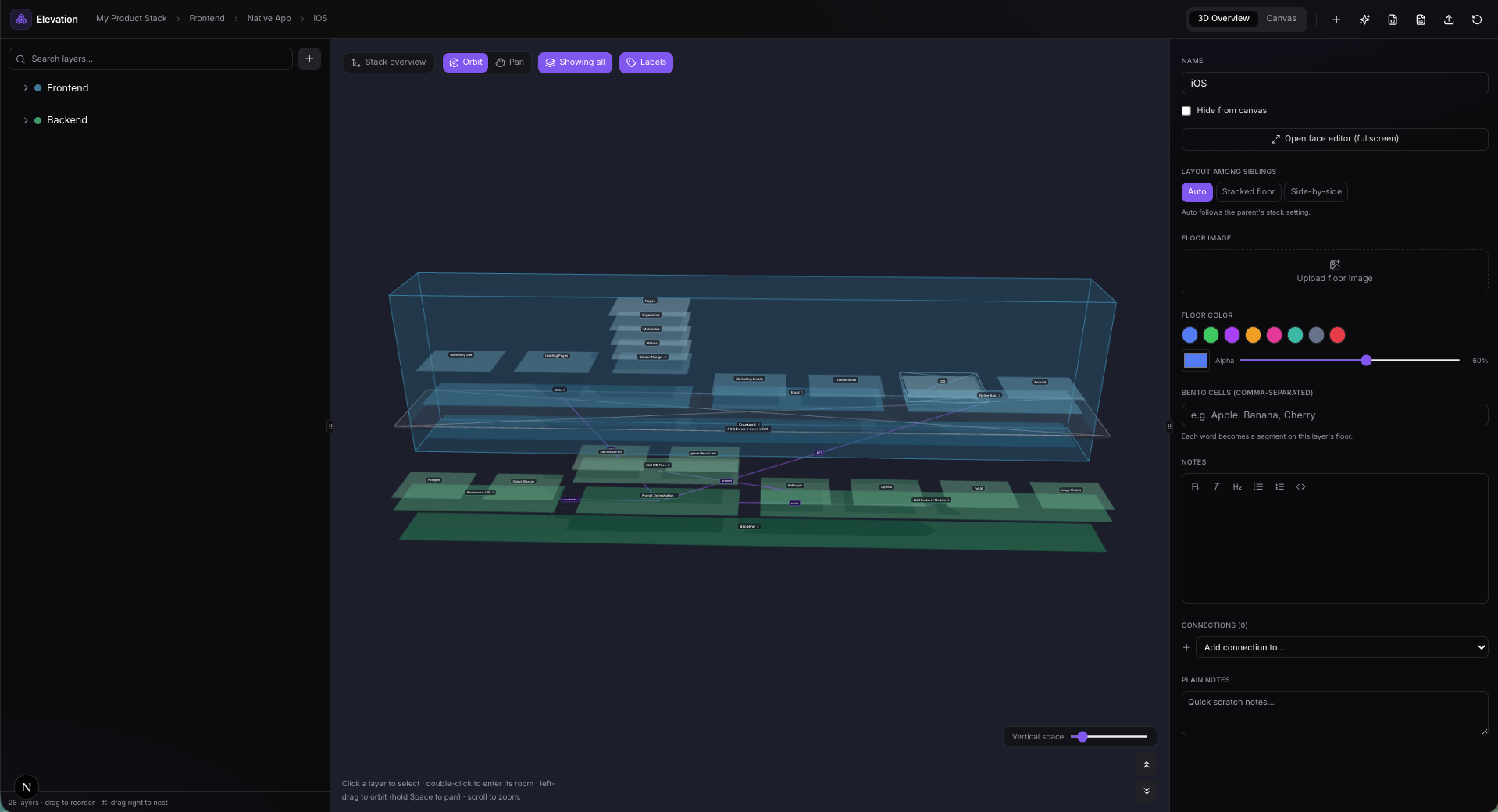
Little Learners — the human-scale one
In June I built two small Next.js learning apps for my kids' summer: Native American history and reading for my older one, robots and four-letter words for my kindergartner. Each runs on its own dedicated port on the family machine. Smallest project, best user research sessions of my career.
Currently in private research.
What five months taught me
AI didn't replace design judgment — it exposed it. When implementation is nearly free, the differentiator is knowing what to build, what to cut, and when a generated option is actually good. Every project above lived or died on decisions, not code.
Shipping is a design skill. Deployment gates, edge middleware, backup strategies, port management across six local dev servers — these used to be someone else's job. Owning them made my designs more honest.
Iteration beats inspiration. The project I'm proudest of (Brand Builder) isn't the cleverest idea — it's the one I committed to 352 times.
I also keep everything organized in an Obsidian-based project index with one-click launchers for every dev server — because a portfolio of working software deserves working infrastructure. (That system might be its own post.)
I'm looking for my next role as a product designer who ships. If your team is figuring out what AI means for product design, I'd love to talk: info@paulgoins.com
Building a Personal AI Prompt Management System
Thoughts & experiments on brand, design systems, and tools that empower designers and creatives.
As a designer who regularly blends traditional UX/UI work with AI-assisted creation (image generation, video, and copy), I kept hitting the same friction: my best prompts scattered across chat histories, random notes, and forgotten files. I decided to fix it myself by building Prompt Vault (working name: CreaturePrompt) — a lightweight, self-hosted prompt management system tailored for creatives working across modalities.

Facing the empty prompt screen in your favorite LLM image/video tool? Introducing Prompt Vault.
The Problem I Set Out to Solve
Creative AI workflows move fast. One minute you’re refining a Midjourney character, the next you’re prompting Claude for campaign copy or Runway for motion. Without structure, great prompts vanish. Rebuilding them from memory wastes time and leads to inconsistent results.
I wanted a personal tool that would:
Organize prompts by type (Image, Video, Text) while keeping them searchable and reusable
Enforce a consistent, effective structure without feeling rigid
Store reference images and thumbnails for visual work
Stay simple, fast, and accessible across devices — including offline-first use
Commercial options either didn’t exist, felt bloated, or locked you into one platform. So I designed and built my own.
Core Concept: The ROSES Framework
At the heart of Prompt Vault is the ROSES structure I developed:
Role — Who the AI should be
Objective — What it needs to achieve
Scenario — The context or constraints
Expected Solution — Desired output characteristics
Steps — How to approach it
This framework adapts beautifully across tools. An image prompt’s “Steps” might specify style and composition, while a text prompt’s might outline structure and tone. It forces clarity — which consistently yields stronger AI outputs — without sacrificing creativity.
Key Features (Designed for Real Creative Flow)
Multi-Modal Tabs — Switch instantly between Image, Video, and Text libraries. Same ROSES backbone, context-aware fields.
Visual Reference System — Upload reference images that attach to prompts and generate thumbnails. Perfect for style references, mood boards, or before/after examples.
Tag-Based Organization — Flexible tags (#product-photography, #anime-character, #brand-voice) instead of rigid folders. Quick filtering and search.
Live Prompt Preview — See the assembled prompt in real time as you fill fields — no surprises when copying to your AI tool.
Scratchpad — A quick overlay for testing variations before saving the winner.
Cloud Sync — Self-hosted backend with image storage so your library travels with you.
The entire experience is intentionally minimal and focused — built for speed during creative sprints.
How I Built It (Designer-Led Development)
I approached this as a product designer who codes. Started with a single HTML file + basic form to validate the UX in real time. Once the interaction felt right, I layered in:
Frontend: Pure HTML/JS with Alpine.js (tiny and reactive) + Tailwind. Deployed on Vercel for instant updates.
Backend: Node.js + Express + SQLite (simple, reliable, file-based). Image uploads via Multer. Hosted on AWS Lightsail.
Infrastructure: HTTPS via Let’s Encrypt + Nginx, PM2 for uptime, automatic backups.
This lean stack let me iterate rapidly — exactly what a solo designer needs. No heavy frameworks slowing me down. I could tweak the UI, refresh the browser, and test immediately.
Key lessons from the build:
Constraints improve design — Removing drag-and-drop and complex folders made the app faster and clearer.
ROSES is universal — It now helps me write better marketing copy, scripts, and even UX documentation.
Velocity matters — Simple tools ship faster and feel more joyful to use.
Future Product Vision
Prompt Vault started as a personal solution, but I see clear paths to turn it into something bigger for the creative community:
User accounts and shared prompt libraries
Prompt versioning and iteration history
One-click integration with major AI platforms
Curated template packs for common design use cases (e.g., “E-commerce Product Hero Shots,” “Brand Storytelling Emails”)
I’m excited about building more productivity tools like this — ones that remove friction for designers and creatives rather than adding complexity.
Try It or Fork It (coming soon to GitHub)
Prototype available here: CreaturePrompt.com (self-hosted version coming soon).
The code is intentionally approachable — you could fork and customize your own version quickly. If you work with AI prompts regularly, I’d love your feedback on what would make it even more useful.
See more of my visual and design experiments: instagram.com/serfdad
Questions about the process, UX decisions, or potential features? Reach out via paulgoins.com/contact or check the repo.
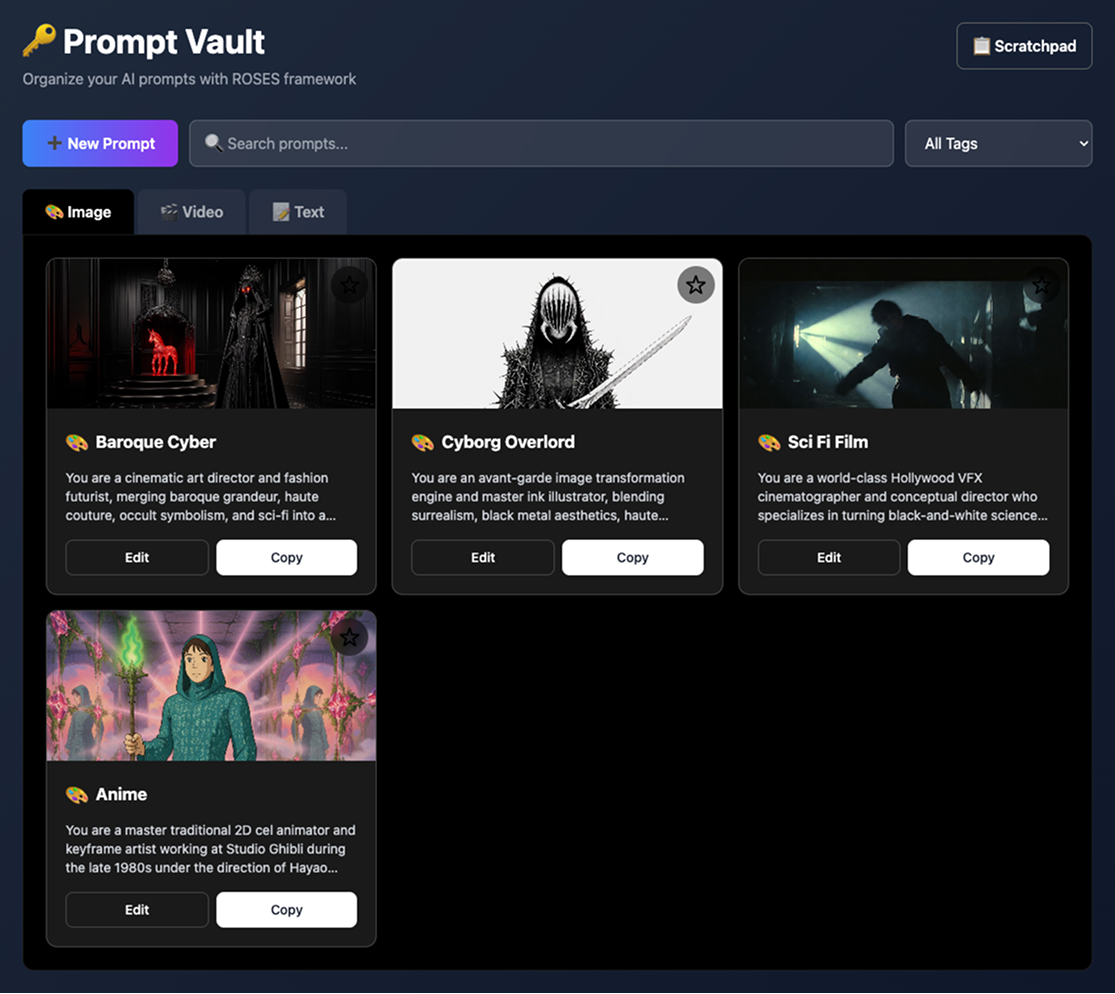
Cool character & scene creation prompts ready to copy and paste into your favorite LLM Imagine creation tool.
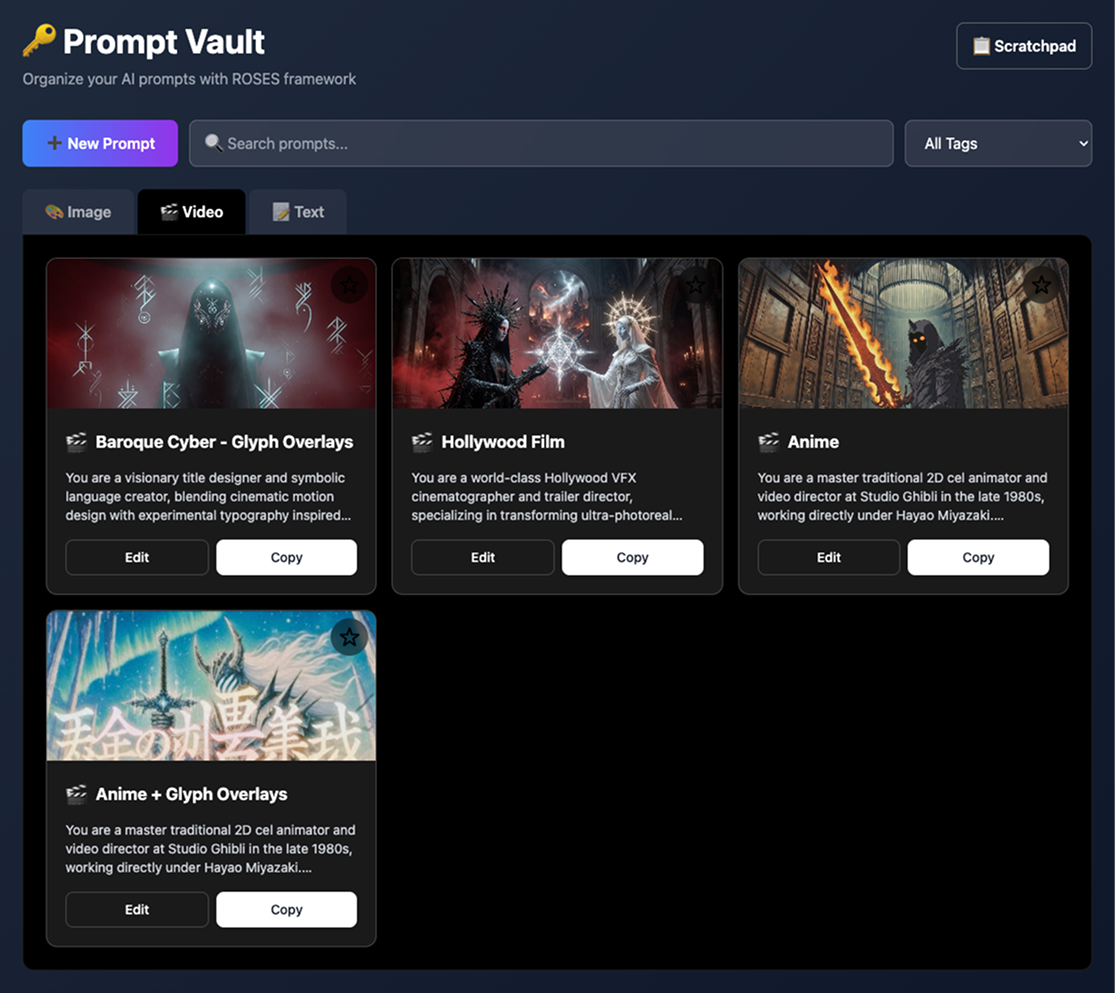
Image, Video and Text tabs keep prompts organized and quick to grab during your workflow.
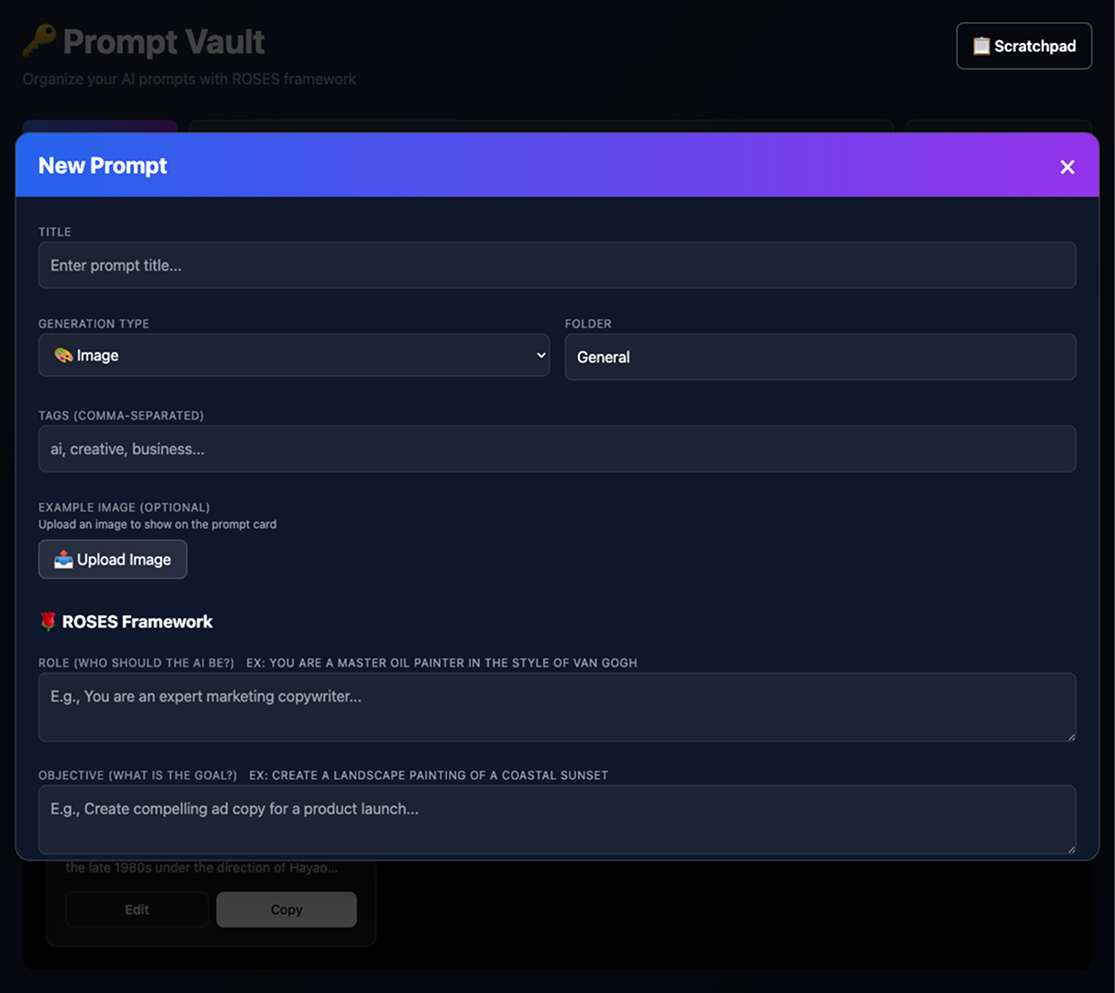
Easy prompt creation and editing

Multi-modal prompt sorting & search
Each type uses the same ROSES framework but adapts to the medium. For example, an image prompt's "Steps" might be "Use thick brushstrokes, layer colors, add texture," while a text prompt's "Steps" could be "1. Hook with a question, 2. Provide solution, 3. Call to action."
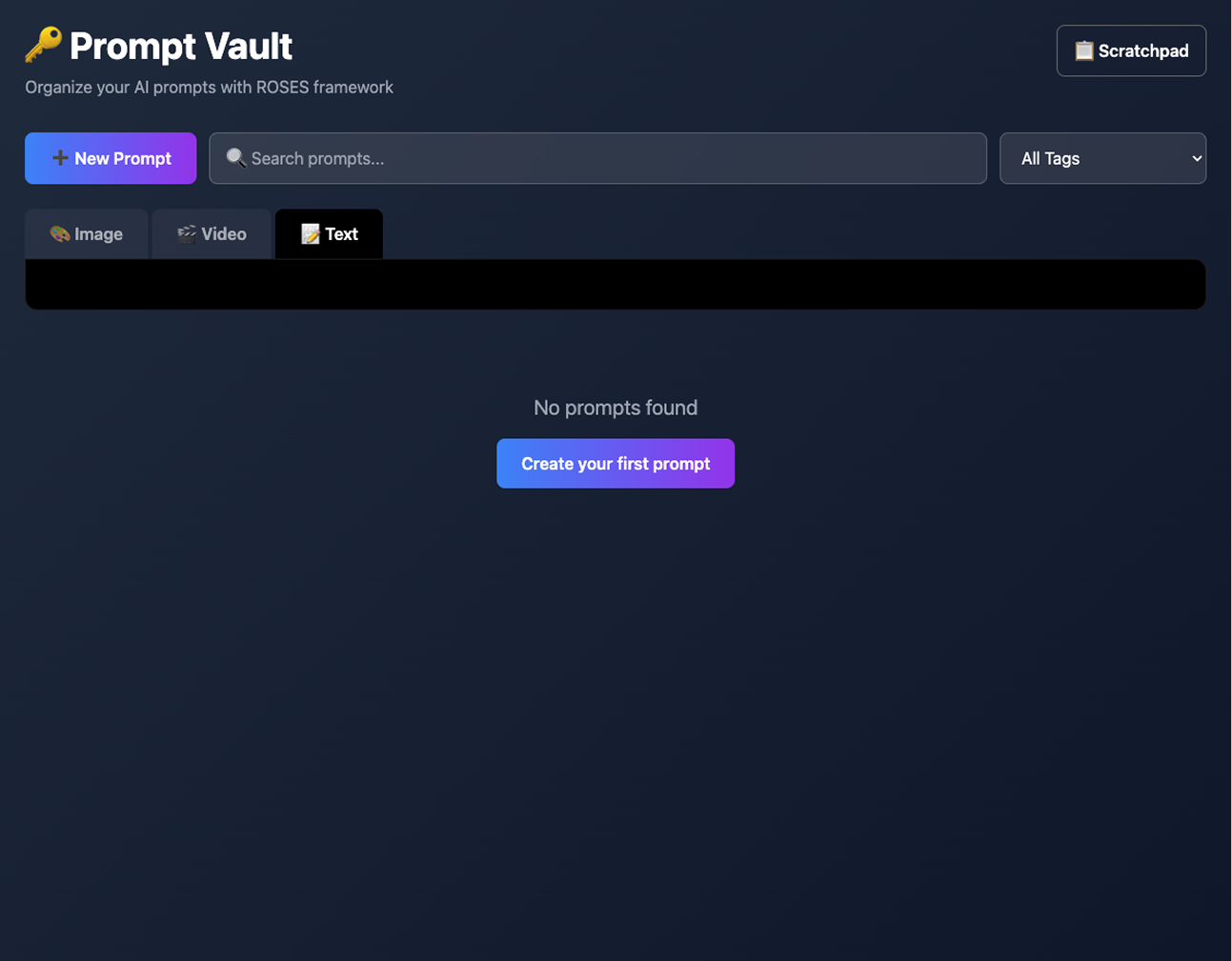
Easy to fork and build your own site using this idea & structure.
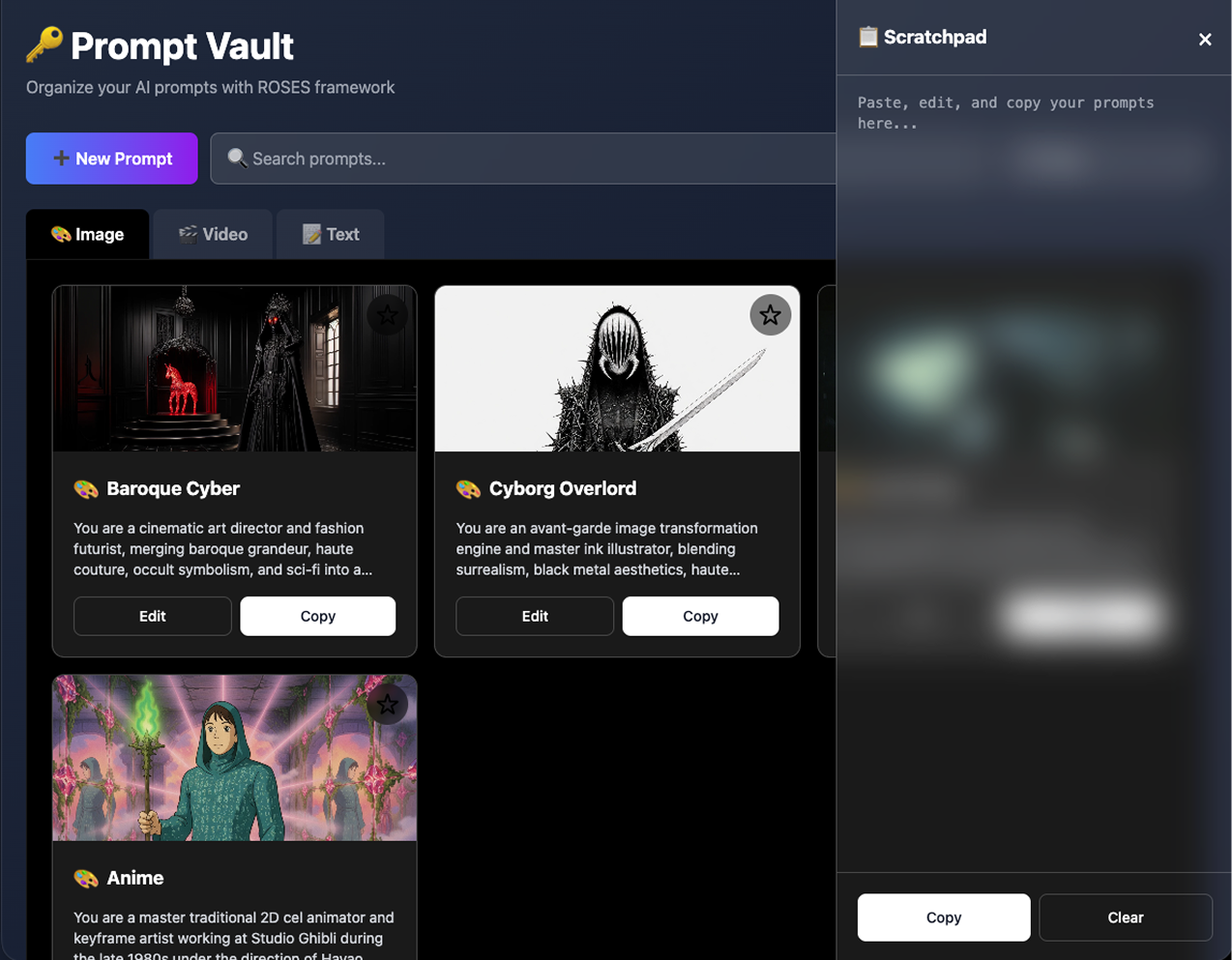
Optional, scratchpad overlay for mincing and editing text without leaving the current window.